---
title: Smarter Contact Calendar
description: Learn how Smarter Contact's built-in Calendar helps real estate investors schedule follow-ups, sync their team, and close more deals — without switching tabs.
---
[](https://smartercontact.com/)
☰
Solutions
- [Real Estate Investing](https://smartercontact.com/real-estate-investing/)
- [Real Estate Agent](https://smartercontact.com/real-estate-agent/)
- [General Sales/Marketing](https://smartercontact.com/general-sales-marketing/)
- [Automotive](https://smartercontact.com/automotive/)
- [Event Promotion](https://smartercontact.com/event-promotion/)
- [Gym/Fitness](https://smartercontact.com/gym-fitness/)
- [Staffing](https://smartercontact.com/staffing/)
Features
- [Texting Automation](https://smartercontact.com/sms-automation/)
- [Calling](https://smartercontact.com/calling/)
- [Reporting](https://smartercontact.com/reporting/)
- [Built-in CRM](https://smartercontact.com/built-in-crm/)
- [Custom Campaigns](https://smartercontact.com/custom-campaigns/)
- [Calendar](https://smartercontact.com/calendar/)
- [Integrations](https://smartercontact.com/integrations/)
[Pricing](https://smartercontact.com/pricing/)
Resources
- [Launch Control vs Smarter Contact](https://smartercontact.com/launch-control-vs-smarter-contact/)
- [Smarter Contact Managed](https://smartercontact.com/managed-plans/)
- [Our Team](https://smartercontact.com/our-team/)
- [Tutorials](https://smartercontact.com/tutorials/)
- [Our Story](https://smartercontact.com/our-story/)
- [Help Center](https://support.smartercontact.com/?hsLang=en)
- [Blog](https://smartercontact.com/blog/)
[Affiliate Program](https://lp.smartercontact.com/affiliates) [Dialer](https://smartercontact.com/dialer/)
[Log in](https://app.smartercontact.com/login) [Get started now](https://app.smartercontact.com/signup)
[Skip to content](https://support.smartercontact.com/calendar-overview#main-content)

Open main navigation
Close main navigation
- [Go to App](https://app.smartercontact.com/?utm_source=knowledge_base)
[Go to App](https://app.smartercontact.com/?utm_source=knowledge_base)
How can we help you?
- There are no suggestions because the search field is empty.
1. [Help Center](https://support.smartercontact.com/?hsLang=en)
2. [Calendar](https://support.smartercontact.com/calendar?hsLang=en)
July 31, 2026
# Smarter Contact Calendar
## The Follow-Up Tool for Real Estate Investors
Most deals don't close because someone had the best pitch — they close because someone showed up at the right time with the right context. The **Smarter Contact Calendar** is a built-in scheduling and follow-up tool where every event is linked directly to a contact in your database, so when that reminder fires, you already know who you're calling and exactly where the conversation left off. It's built for real estate and land investors, agents, and home-service businesses who run high-volume pipelines — and it works because the calendar and the CRM are the same tool, not two separate tabs you have to juggle.
### How the Smarter Contact Calendar Works
#### Flexible Views: Month, Week, and Day
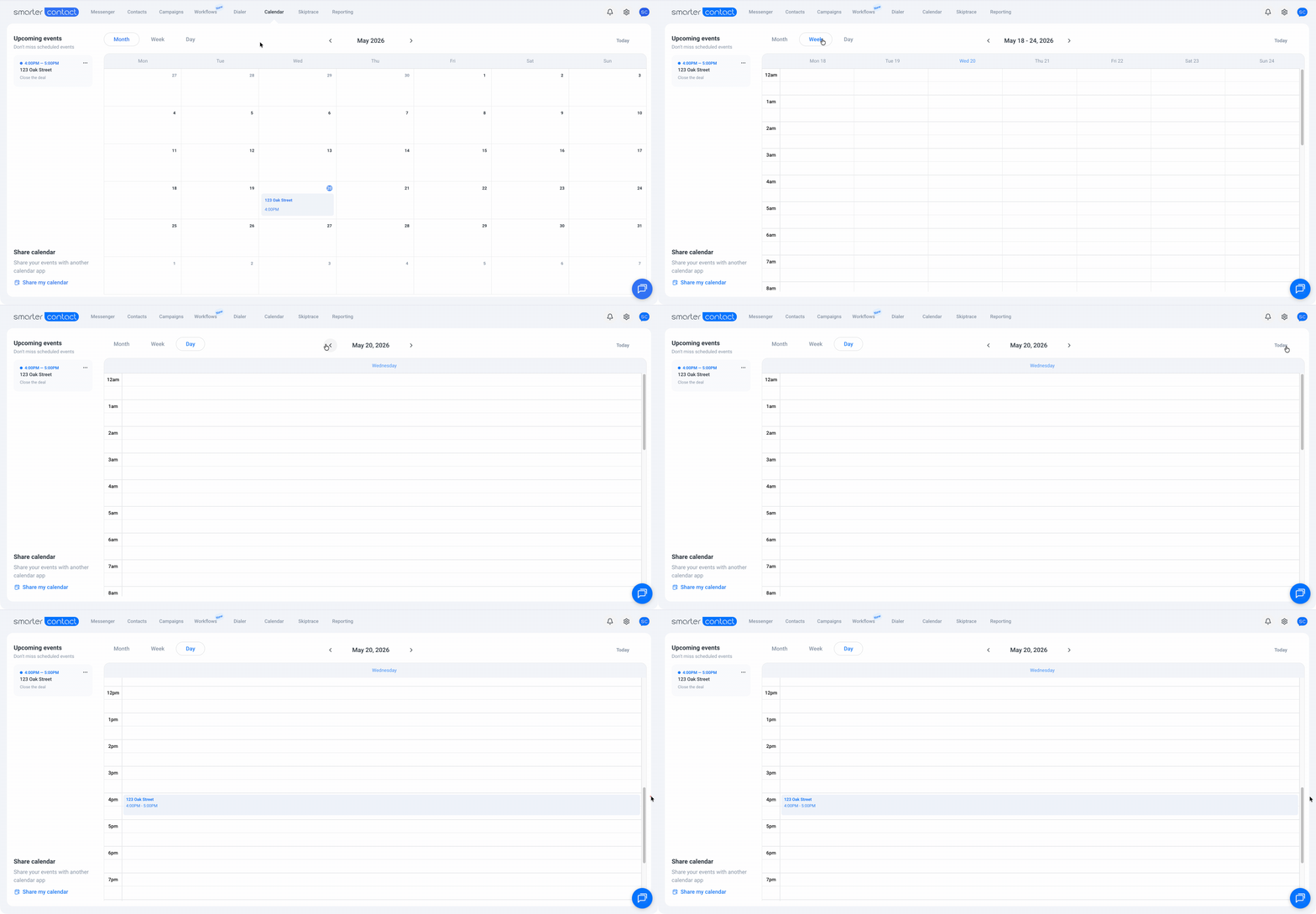
When you open the Calendar tab, you land on **Month view** by default — the best way to spot patterns, busy periods, and follow-up clusters at a glance. Need to zoom in on a specific day or week? Switch to **Week** or **Day view** in one click. If you ever lose your place, the **Today** button in the top-right corner snaps you back instantly.
#### Upcoming Events Panel
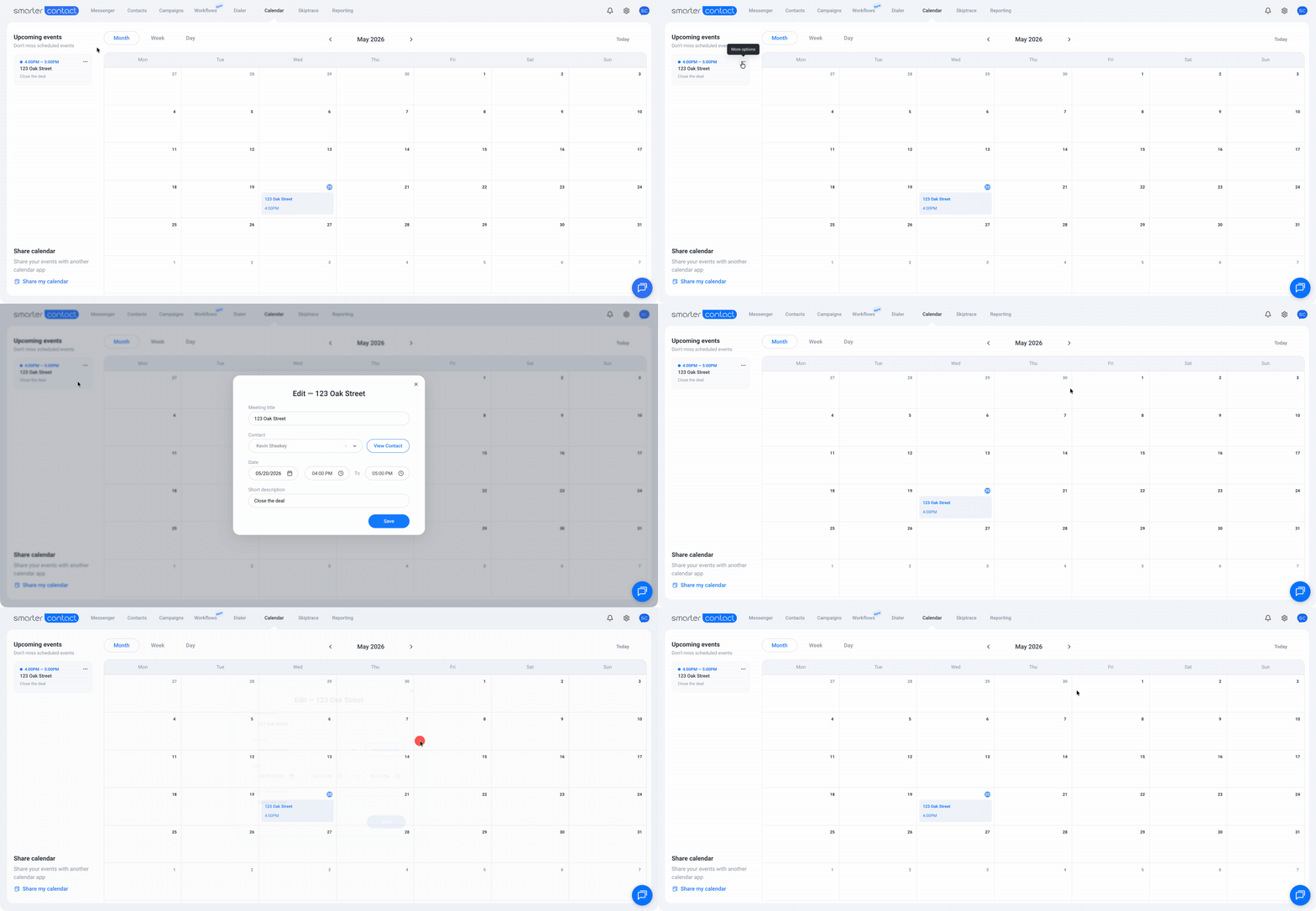
On the left side of the screen, the **Upcoming Events list** shows only future events — nothing historical, nothing cluttered. Each event has a three-dot menu that lets you **edit or delete** it directly. If you open an event to edit it, it opens right on the calendar itself. Move the time, and the event updates automatically. No double entry, no manual cleanup.
You can also click any event directly on the calendar grid to make quick changes without opening a separate panel.
#### Every Event Is Linked to a Real Contact
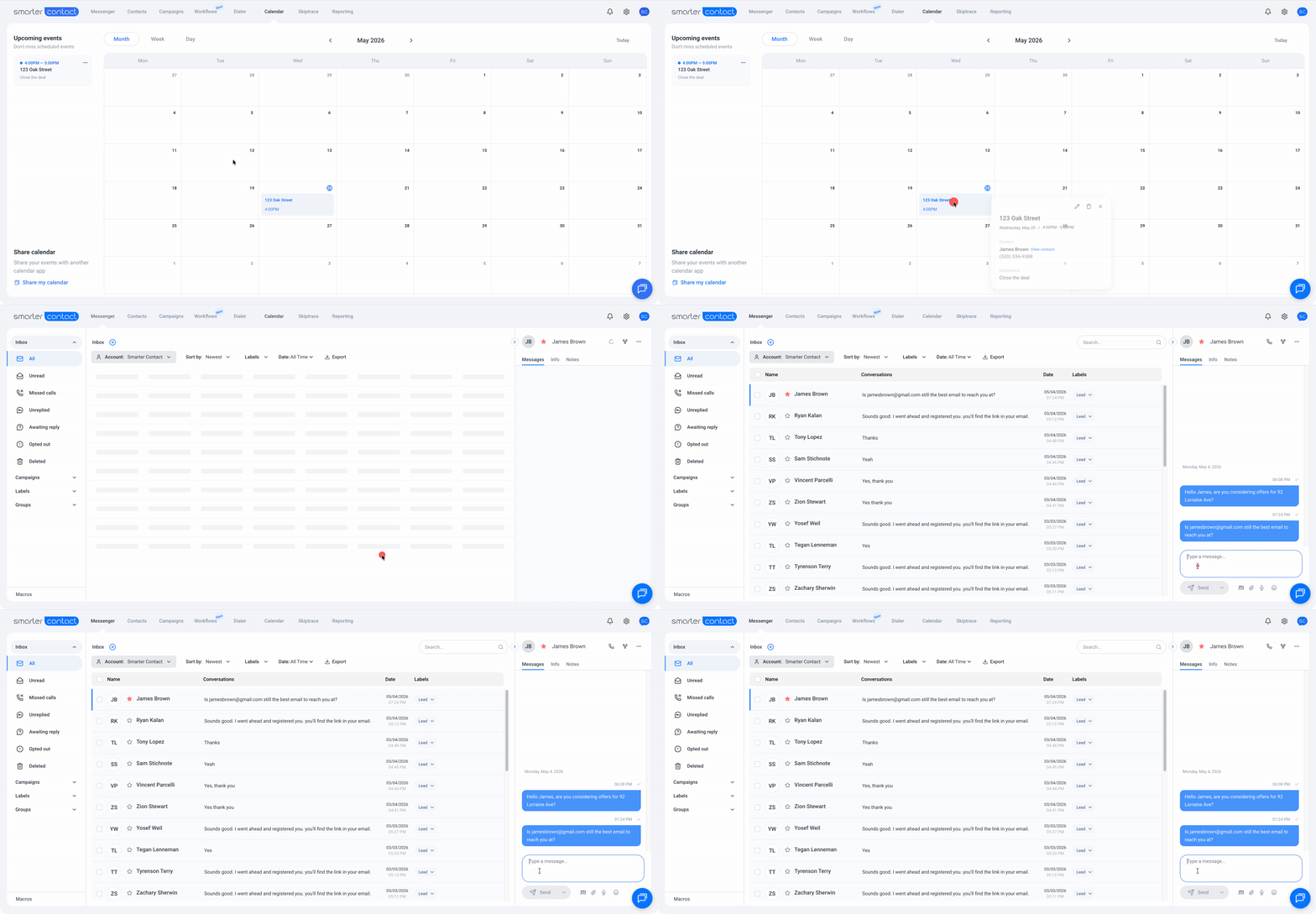
This is what sets the Smarter Contact Calendar apart from every generic scheduling tool. Every event you create is tied to a specific contact in your database. Click **View Contact** on any event and you're taken directly into that person's conversation thread inside the Messenger — the full history of every text, call, and note you've exchanged.
You walk into every follow-up call with complete context. You know what they said last time, what objection they raised, and what you promised.
#### Adding New Events
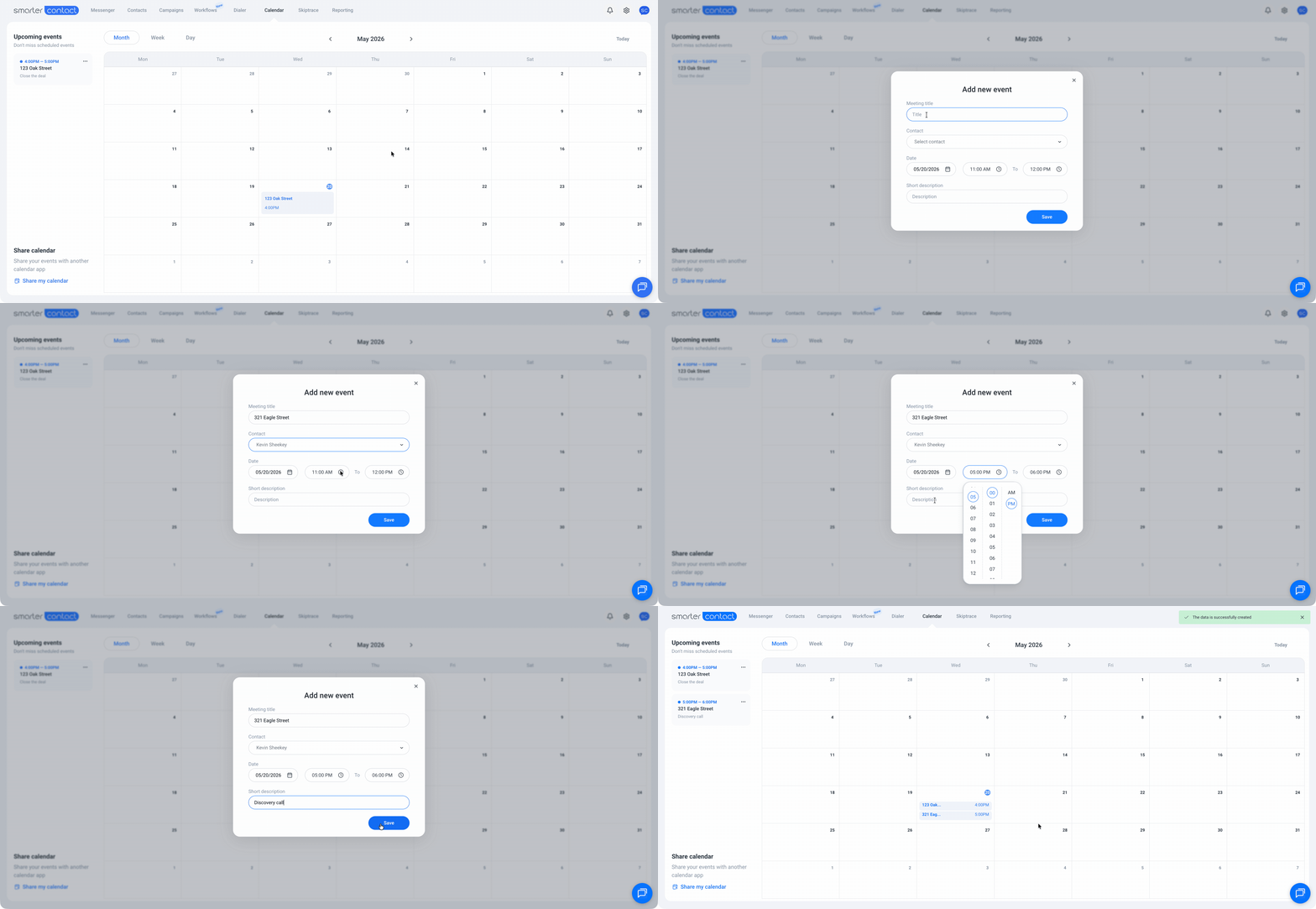
Creating a follow-up takes seconds:
1. Click any cell on the calendar
2. Select a contact from your database
3. Add a title and any notes you want to remember
4. Hit **Save**
The event appears on your calendar instantly, and a **reminder notification** fires when the time approaches — so nothing sneaks up on you.
#### Set Follow-Ups Without Leaving a Conversation
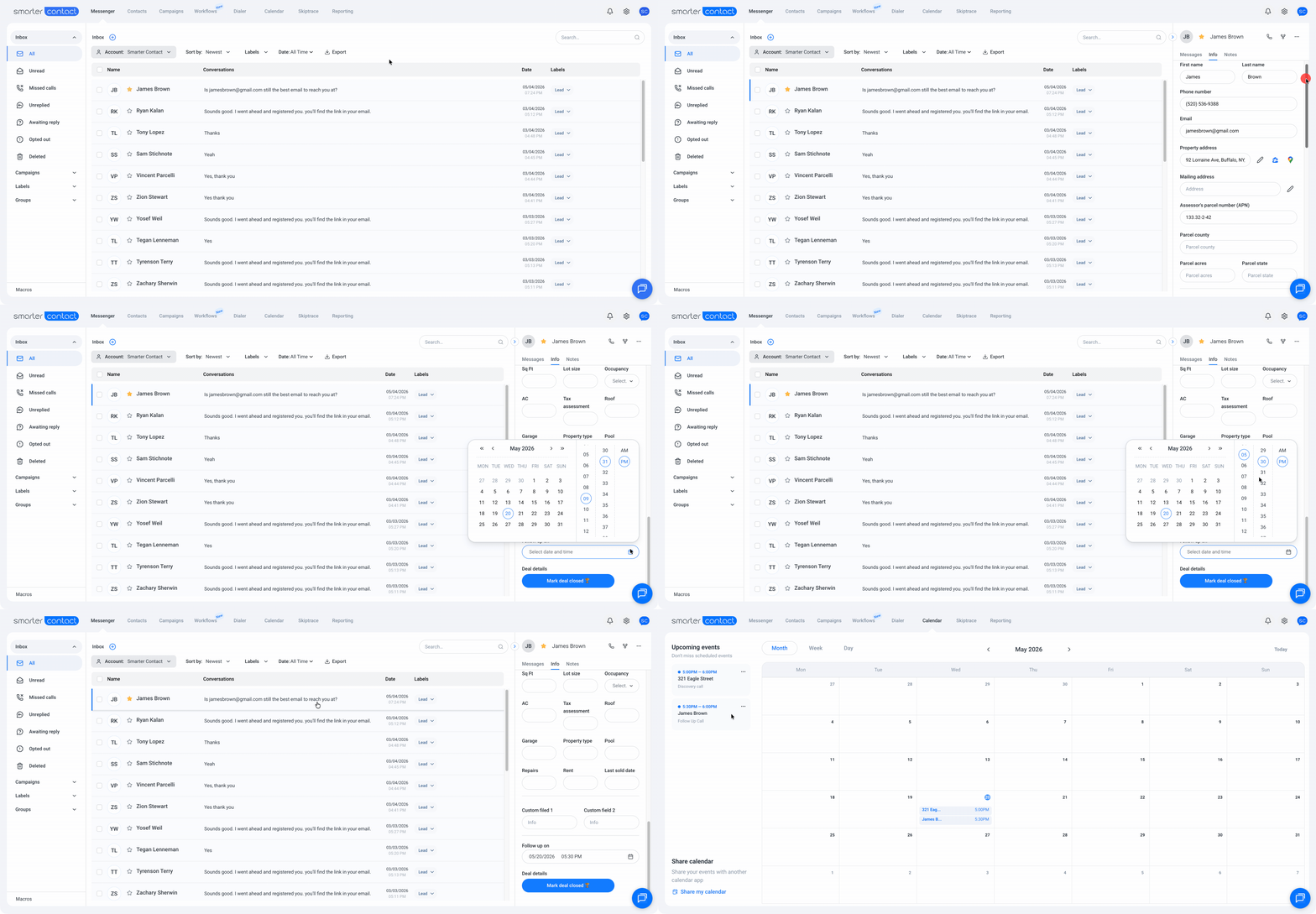
Here's where Smarter Contact earns its name. If you're already in a Messenger thread with a seller and they say, "Call me back Thursday" — you don't need to open another tab or switch to a different app.
In the **Info section** on the right side of the Messenger, scroll to the bottom and set the date in the **Follow-up field**. The event lands directly in your Calendar, already linked to that contact. The whole process takes a few seconds, and you never lose your place in the conversation.
#### Sync With Your External Calendar — and Your Team
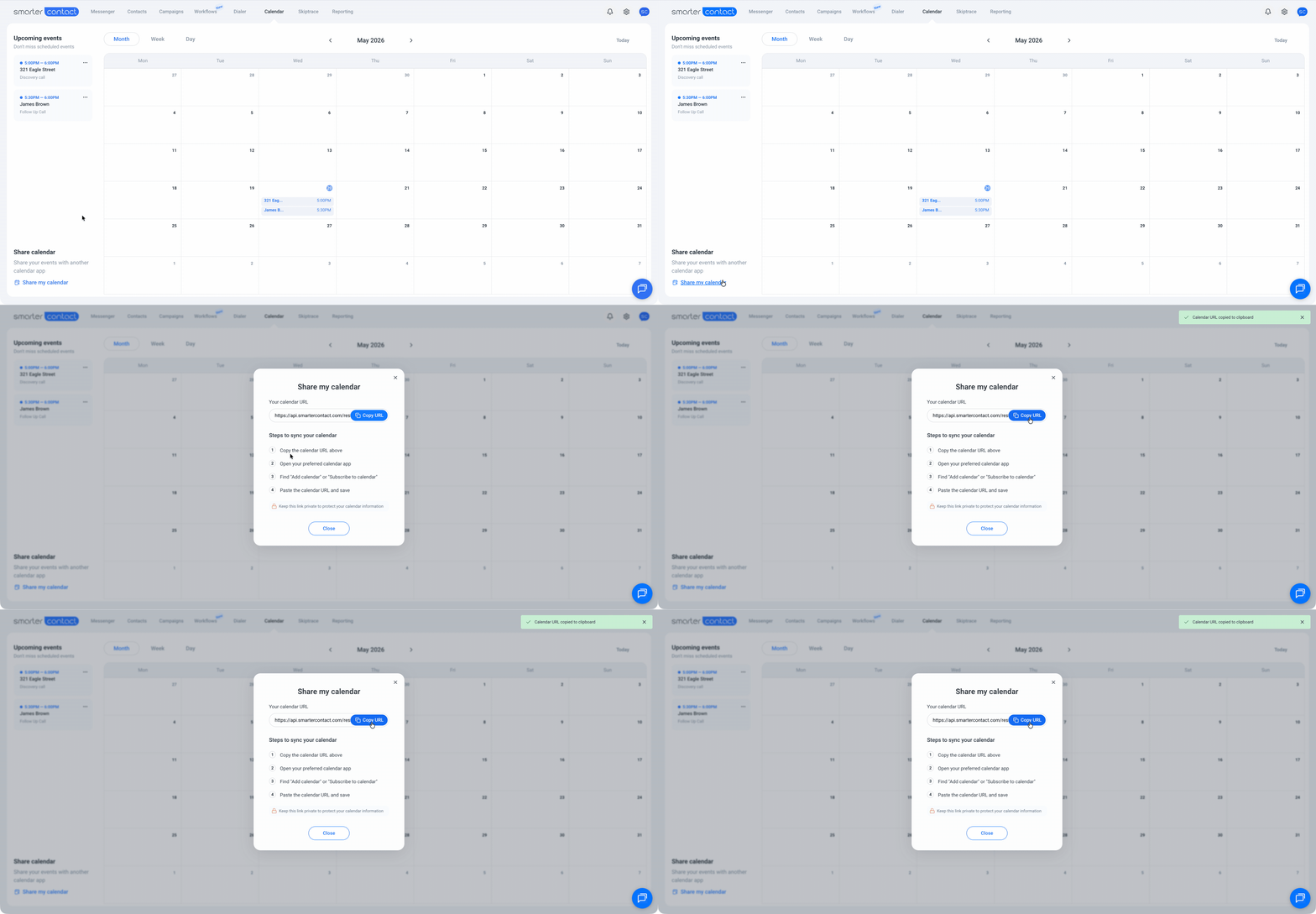
Smarter Contact connects to Google Calendar, Apple Calendar, Outlook, and virtually any other calendar app via a shareable subscription link. Click **Share My Calendar**, copy the link, and paste it into your calendar of choice — your events sync automatically from that point on. Managers and teammates can subscribe to the same link, so everyone stays aligned on who's following up with who without a single check-in call. For the most common calendar integrations, see our guide:
[How to Share Your Calendar with External Calendar Apps →](https://support.smartercontact.com/syncing-your-calendar?hsLang=en)
#### Frequently Asked Questions
- **What happens when I click View Contact on a calendar event?**
You're taken directly to that contact's full conversation thread in the Smarter Contact Messenger — so you can review everything you've discussed before making the call.
- **Can my team see my Smarter Contact calendar?**
Yes. Share your subscription link with anyone on your team and they can add it to their own calendar app. They'll see your events in real time, and any updates you make in Smarter Contact reflect on their end automatically.
- **Does Smarter Contact send reminders for follow-up events?**
Yes. The platform sends a notification to your notifications center when an event is coming up so you're never caught off guard.
- **How fast will updates reflect on my external calendar?**
It depends on your calendar app and its settings. For example, Google Calendar can take up to 24 hours to reflect the update, while iCalendar can be set to refresh as often as every 5 minutes.
#### Stop Letting Follow-Ups Fall Through the Cracks
The Smarter Contact Calendar isn't a feature you use occasionally — it's the system that keeps your pipeline moving. From booking a callback in seconds while you're mid-conversation, to keeping your entire team synced without a single check-in call, it's built around one idea: when a deal is ready to close, you should be ready too.
##### The Smarter Contact Team
- [Contact Us](https://smartercontact.com/contact-us/)
[](http://smartercontact.com)
###### ###### [Product](https://smartercontact.com/pricing/)
[Messaging Plans](https://smartercontact.com/messaging-plan/)
[Calling Plans](https://smartercontact.com/calling-plan/)
[Mobile App](https://smartercontact.com/mobile/)
[What’s New](https://smartercontact.com/whats-new/)
[Pricing](https://smartercontact.com/pricing/)
###### Company
[Privacy Policy](https://smartercontact.com/privacy-policy/)
[Terms & Conditions](https://smartercontact.com/terms-and-conditions/)
[mailto:support@smartercontact.com](mailto:support@smartercontact.com)
Copyright © 2026, Smarter Contact
#### Product
- [Messaging Plans](https://smartercontact.com/messaging-plan/)
- [Calling Plans](https://smartercontact.com/calling-plan/)
- [Mobile App](https://smartercontact.com/mobile/)
- [What’s New](https://smartercontact.com/whats-new/)
- [Pricing](https://smartercontact.com/pricing/)
#### Company
- [Privacy Policy](https://smartercontact.com/privacy-policy/)
- [Terms & Conditions](https://smartercontact.com/terms-and-conditions/)
#### Solutions
- [Investors](https://smartercontact.com/real-estate-investors/)
- [Agents](https://smartercontact.com/real-estate-agents/)
- [Brokers](https://smartercontact.com/real-estate-brokers/)
- [Wholesalers](https://smartercontact.com/real-estate-wholesalers/)
- [Land Flippers](https://smartercontact.com/real-estate-land-flippers/)
- [Fix and Flippers](https://smartercontact.com/real-estate-fix-and-flippers/)
- [Land Developers](https://smartercontact.com/real-estate-land-developers/)
- [Property Developers](https://smartercontact.com/real-estate-property-developers/)
#### Comparison
- [Launch Control vs Smarter Contact](https://smartercontact.com/launch-control-vs-smarter-contact/)
- [Batch Leads vs Smarter Contact](https://smartercontact.com/batch-leads-vs-smarter-contact/)
- [Lead Sherpa vs Smarter Contact](https://smartercontact.com/lead-sherpa-vs-smarter-contact/)
- [ReplySmart vs Smarter Contact](https://smartercontact.com/replysmart-vs-smarter-contact/)
- [ZeitBlast vs Smarter Contact](https://smartercontact.com/zeitblast-vs-smarter-contact/)
- [Sendivo vs Smarter Contact](https://smartercontact.com/sendivo-vs-smarter-contact/)
- [HighLevel vs Smarter Contact](https://smartercontact.com/highlevel-vs-smarter-contact/)
- [XLeads vs Smarter Contact](https://smartercontact.com/xleads-vs-smarter-contact/)
- [ReadyMode vs Smarter Contact](https://smartercontact.com/readymode-vs-smarter-contact/)
- [BatchDialer vs Smarter Contact](https://smartercontact.com/batchdialer-vs-smarter-contact/)
- [PhoneBurner vs Smarter Contact](https://smartercontact.com/phoneburner-vs-smarter-contact/)
- [Roor vs Smarter Contact](https://smartercontact.com/roor-vs-smarter-contact/)
#### Resources
- [Tutorials](https://smartercontact.com/tutorials/)
- [Help Center](https://support.smartercontact.com/?hsLang=en)
- [Careers](https://smartercontact.hurma.work/public-vacancies)
[](https://smartercontact.com)
[](https://apps.apple.com/us/app/smarter-contact/id1637673379) [](https://play.google.com/store/apps/details?id=com.smartercontactapp&pli=1)
© 2026 Copyright Smarter Contact.
All Rights Reserved.
```json
{
"@context" : "https://schema.org",
"@type" : "VideoObject",
"caption" : {
"@type" : "MediaObject",
"contentUrl" : "https://support.smartercontact.com/media-transcripts/213264578745/en.vtt",
"inLanguage" : "en",
"name" : "en Captions"
},
"contentUrl" : "https://21860142.fs1.hubspotusercontent-na1.net/hubfs/21860142/video_assets/213264578745/inherited/web_optimized.mp4",
"dateModified" : "2026-05-20T16:02:10.437Z",
"duration" : "PT3M1S",
"height" : 1080,
"name" : "Calendar Overview",
"thumbnailUrl" : "https://support.smartercontact.com/hubfs/Calendar%20Overview.mp4/medium.jpg",
"uploadDate" : "2026-05-20T16:00:57.606Z",
"width" : 1920
}
```