---
title: Reporting Overview
description: Discover and track every metric on the Smarter Contact Reporting page — from SMS delivery and reply rates to call conversions, response times, and CSV exports.
---
[](https://smartercontact.com/)
☰
Solutions
- [Real Estate Investing](https://smartercontact.com/real-estate-investing/)
- [Real Estate Agent](https://smartercontact.com/real-estate-agent/)
- [General Sales/Marketing](https://smartercontact.com/general-sales-marketing/)
- [Automotive](https://smartercontact.com/automotive/)
- [Event Promotion](https://smartercontact.com/event-promotion/)
- [Gym/Fitness](https://smartercontact.com/gym-fitness/)
- [Staffing](https://smartercontact.com/staffing/)
Features
- [Texting Automation](https://smartercontact.com/sms-automation/)
- [Calling](https://smartercontact.com/calling/)
- [Reporting](https://smartercontact.com/reporting/)
- [Built-in CRM](https://smartercontact.com/built-in-crm/)
- [Custom Campaigns](https://smartercontact.com/custom-campaigns/)
- [Calendar](https://smartercontact.com/calendar/)
- [Integrations](https://smartercontact.com/integrations/)
[Pricing](https://smartercontact.com/pricing/)
Resources
- [Launch Control vs Smarter Contact](https://smartercontact.com/launch-control-vs-smarter-contact/)
- [Smarter Contact Managed](https://smartercontact.com/managed-plans/)
- [Our Team](https://smartercontact.com/our-team/)
- [Tutorials](https://smartercontact.com/tutorials/)
- [Our Story](https://smartercontact.com/our-story/)
- [Help Center](https://support.smartercontact.com/?hsLang=en)
- [Blog](https://smartercontact.com/blog/)
[Affiliate Program](https://lp.smartercontact.com/affiliates) [Dialer](https://smartercontact.com/dialer/)
[Log in](https://app.smartercontact.com/login) [Get started now](https://app.smartercontact.com/signup)
[Skip to content](https://support.smartercontact.com/reporting-overview#main-content)

Open main navigation
Close main navigation
- [Go to App](https://app.smartercontact.com/?utm_source=knowledge_base)
[Go to App](https://app.smartercontact.com/?utm_source=knowledge_base)
How can we help you?
- There are no suggestions because the search field is empty.
1. [Help Center](https://support.smartercontact.com/?hsLang=en)
2. [Reporting](https://support.smartercontact.com/reporting?hsLang=en)
October 24, 2026
# Reporting Overview
## Understanding Your Performance
The **Reporting page** is your command center for tracking campaign performance. It pulls together every key metric so you can quickly see what's working, catch issues early, and make data-driven decisions about your campaigns.
The Reporting page is split into two views:
- **Messaging** — metrics for your SMS campaigns
- **Calling** — metrics for your call activity
### Messaging
#### Reporting access by account type
If you have an **admin account**, you can review Messaging metrics for your own account, and access each of your sub-accounts to check their reporting independently.
#### Filters
At the top of the Messaging view, you'll find three filters that let you narrow down the data you're looking at:
##### Date Range
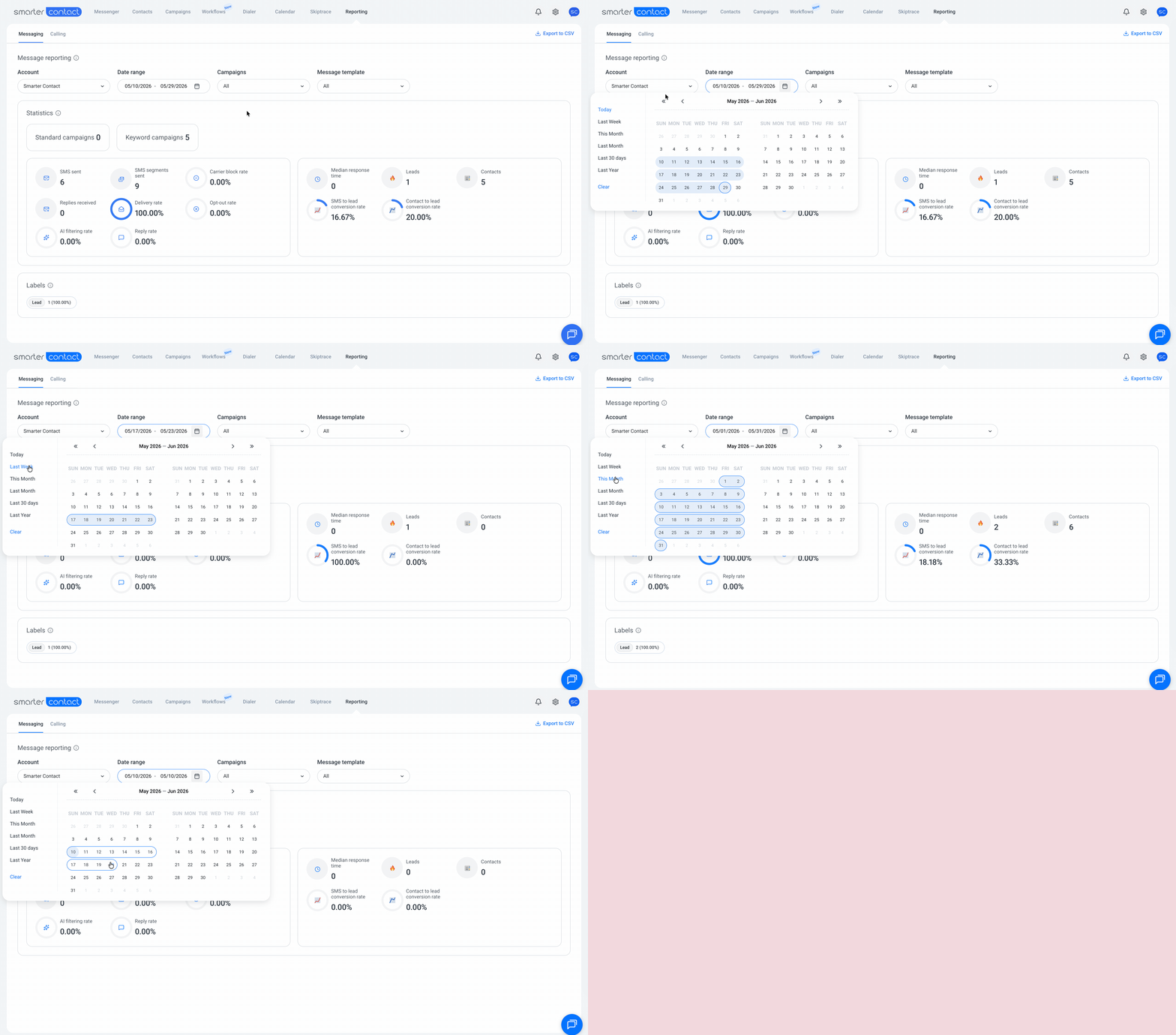
By default, the page displays data from the **last 7 days**. To change this, click anywhere on the **Date Range** field. You can either:
- Pick a preset on the left side ("Today", "This month", and so on)
- Manually select a custom start and end date from the calendar
##### Campaigns
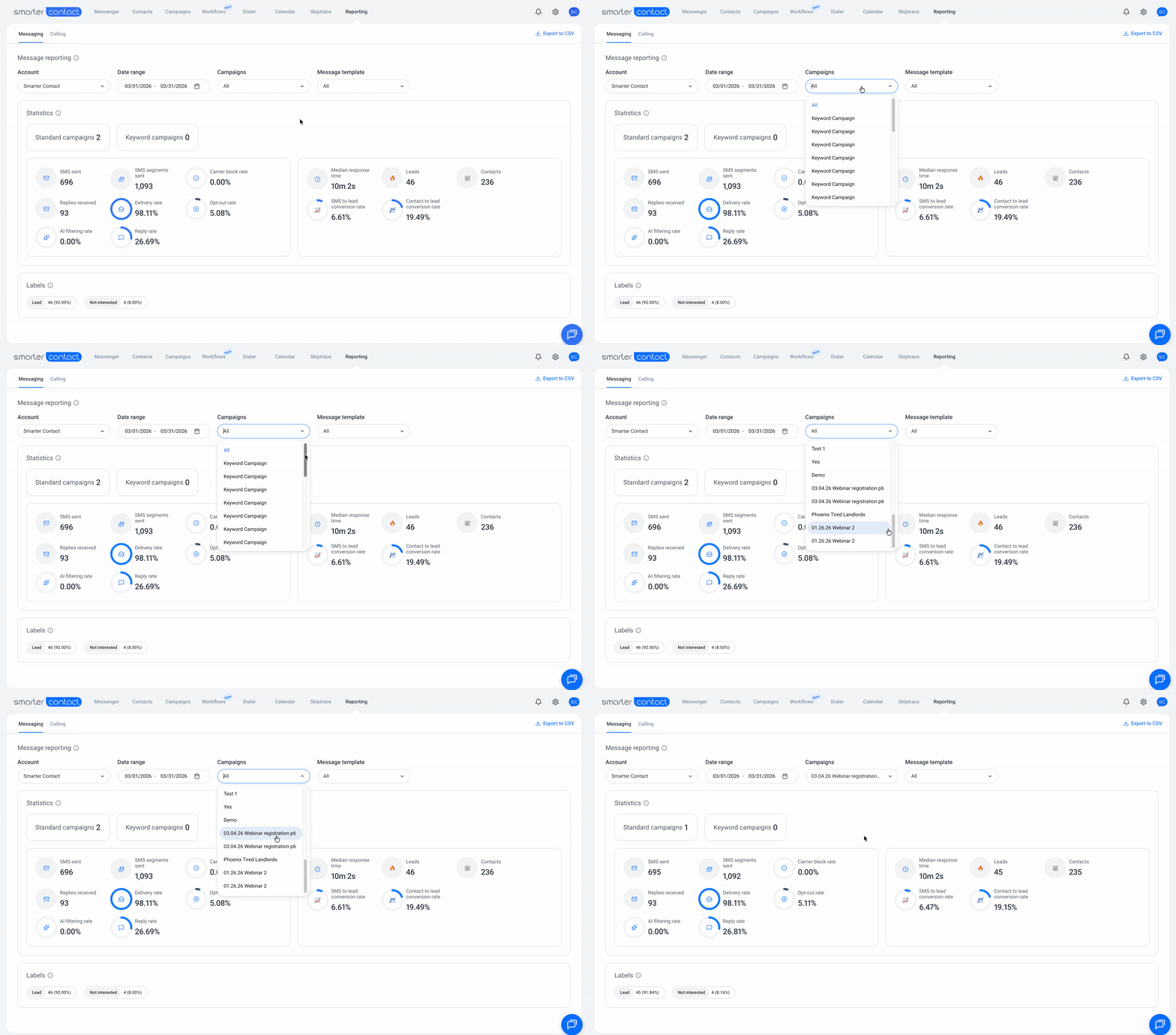
By default, you'll see combined results for every campaign launched within the selected date range. To focus on a single campaign, open the **Campaigns** dropdown and choose the one you want to review.
##### Message Templates
By default, the page shows every template used within the selected date range. To review metrics for one specific template, open the **Message Template** dropdown and select it.
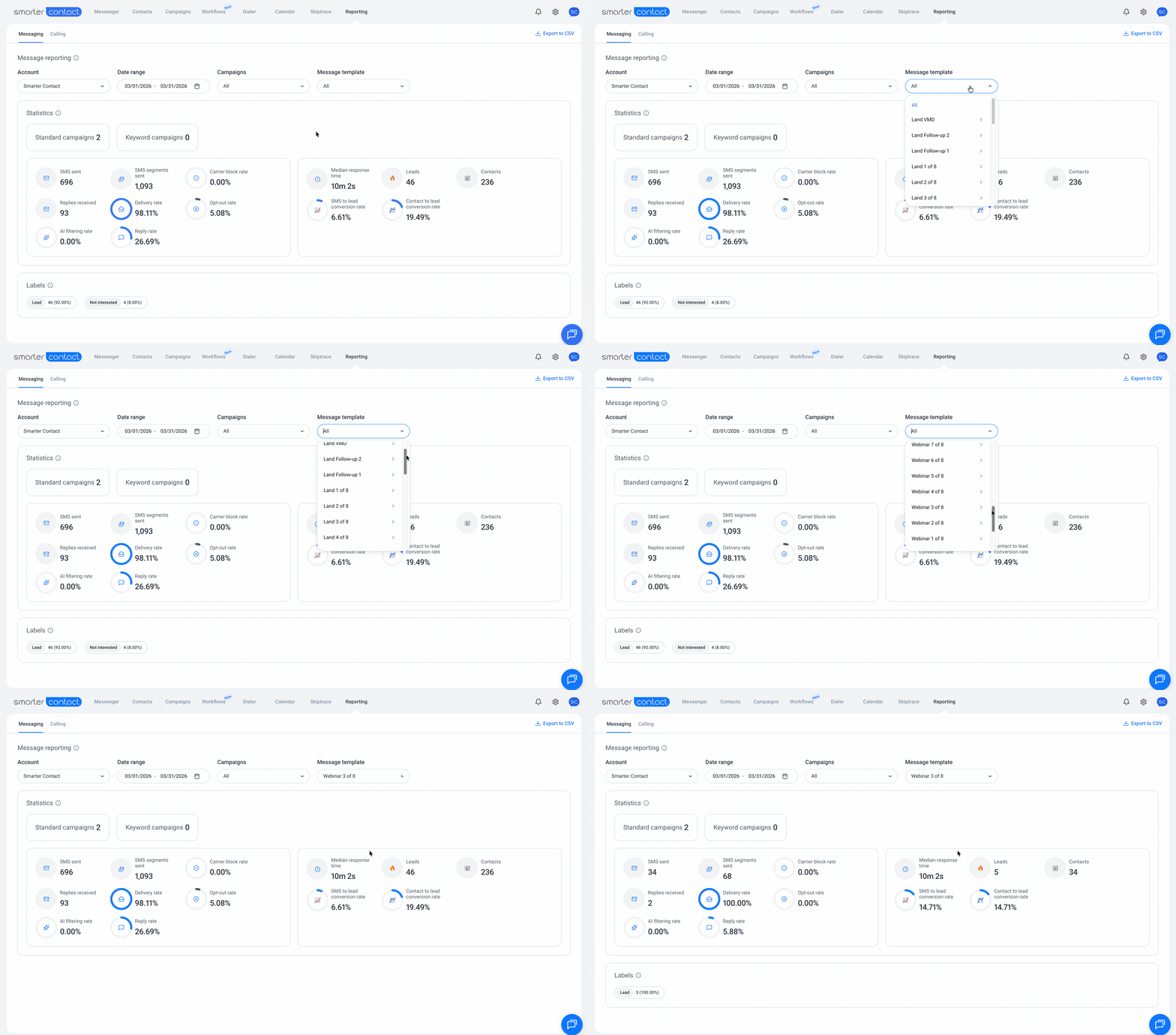
💡 **Pro tip:** If you notice a higher-than-usual carrier block rate on a campaign, filter by template one at a time. This helps you isolate the specific template that's getting flagged — carriers sometimes classify certain wording or links as spam, and identifying the culprit lets you adjust before it impacts more sends.
#### **Statistics**
Once your filters are set, you'll see a breakdown of your KPIs. Use these to gauge campaign health, measure outcomes, and spot trends over time.
##### Campaign Counter
The total number of campaigns created within the selected date range, broken down into two types:
- **Standard Campaigns** — outbound campaigns you launch to your contact lists
- **Keyword Campaigns** — inbound campaigns triggered when contacts text in a specific keyword
##### SMS sent
The total number of messages sent across your selected campaign(s) during the time range. This includes **both blast-sent messages and manually sent ones** from your inbox.
##### SMS Segments Sent
SMS messages are billed in segments. A message of **160 characters or less** counts as 1 segment; longer messages are split into multiple segments before being sent. This metric shows the total number of segments sent across your selected campaign(s) during the time range — which is what carriers actually charge for.
##### Carrier Block Rate
The percentage of messages in your campaign(s) that carriers blocked from being delivered. Carriers block messages for several reasons, including spammy language, suspicious links, sender reputation issues, or 10DLC compliance violations.
***Calculated****: (Carrier blocked campaign messages) / Total campaign messages*
##### Replies Received
The total number of inbound messages received across your selected campaign(s), date range, and template(s).
##### Delivery Rate
The percentage of messages that carriers successfully delivered across your selected campaign(s), date range, or template(s). A healthy delivery rate is one of the strongest indicators that your messages are reaching real recipients.
***Calculated****: (Delivered campaign messages) / Total campaign messages*
> ⓘ **Note:** The reporting page calculates delivery rate using only the **first sent message** in a campaign and only messages within the selected date range (replies are excluded).
##### Opt-out Rate
The percentage of contacts who opted out of receiving messages from you — either by replying "STOP" or using other opt-out language (e.g., "unsubscribe", "remove me", "quit").
***Calculated****: opt-out messages / Total*
##### *SI filtering Rate*
The percentage of contacts our SI filtered out after detecting signs that they want to stop receiving messages.
> ⓘ **Note:** SI filtering doesn't require explicit opt-out language. Our system can detect intent from phrases that signal disinterest or a request to stop, even when they don't include "STOP" or similar keywords.
##### Reply Rate
The percentage of contacts who replied to your messages within your selected campaign(s), date range, and template(s). Reply rate is one of the clearest signals of how well your messaging resonates with your audience.
***Calculated****: (Total number of Contacts responded / Total contacts in all campaigns) × 100*
Key rules for the calculation:
- **Unique contacts only** — if a contact replies 2+ times in a campaign sequence, it's counted only once, at the step where they responded first
- **Only replies within the selected date range** are counted
- **MMS messages are included** in the calculation
##### Median Response time
The median time it takes you (or your team) to reply to inbound SMS/MMS messages from contacts. This metric reflects how quickly contacts hear back from you when they engage.
***How the median works:***
The system collects all response time values, sorts them, then:
Odd array length → takes the middle value (e.g., \[20, 30, 40, 50, 60\] → median = 40)
Even array length → takes the average of the two middle values (e.g., \[10, 20, 30, 40, 50, 60\] → median = (30+40)/2 = 35)
ⓘ **Note:** The **Campaigns** and **Message Template** filters don't affect this metric — it always reflects your overall response time across all conversations within the selected date range.
*If you want to learn more about Median Response Time, [click this link](https://support.smartercontact.com/median-response-time?hsLang=en).*
Leads
The total number of leads generated within your selected campaign(s) and date range.
##### Contacts
The total number of unique contacts your campaign(s) reached during the selected time range. Each contact is counted once, regardless of how many messages they received.
##### SMS to Lead Conversion Rate
The percentage of leads generated relative to the total number of messages delivered in your campaign(s). This shows how efficiently each delivered message is producing leads — useful for comparing creative performance across campaigns or templates.
***Calculated****: SMS to Lead Conversion Rate = (Leads / Total SMS sent) × 100%*
##### Contact to Lead Conversion Rate
The percentage of leads generated relative to the total unique contacts enrolled in your campaign(s). This shows how effectively your audience is converting — a strong indicator of list quality and targeting.
***Calculated****: Contact to Lead Conversion Rate = (Leads / Number of contacts) × 100%*
##### Labels
Below your statistics, the **Labels** section shows every label that was assigned or used during the selected time range. For each label, you'll see:
- The number of contacts tagged with that label
- The percentage that label represents out of all labels used in the time range
This gives you a quick view of how your conversations are being categorized — helpful for tracking the outcomes you care about most across campaigns.
### Calling
#### Reporting access by account type
If you have an **admin account**, you can review Calling metrics for your own account, and access each of your sub-accounts to check their reporting independently using the **Account** filter at the top of the page.
#### **Filters**
At the top of the Calling view, you'll find filters that let you narrow down the data you're looking at:
##### Account
By default, your own account is selected. If you have sub-accounts, open the **Account** dropdown and choose the one you want to review — each account's calling data is shown separately.
##### Campaigns
By default, you'll see combined results for every campaign in the selected account. To focus on a single campaign, open the **Campaigns** dropdown and choose the one you want to review.
#### Statistics
Once your filters are set, you'll see a breakdown of your calling KPIs. These cover both your call activity and the outcomes that activity is producing.
##### Total Calls Dialed
The total number of outbound calls dialed within your selected account and campaign(s).
##### Total Calls Answered
The total number of outbound calls answered by your dialed contacts.
##### Conversations
The total number of answered outbound calls that lasted **longer than 90 seconds**. Calls past this threshold are typically substantive enough to count as a real conversation rather than a quick "hello and hang up."
##### Response Rate
The percentage of dialed contacts who answered your outbound calls — calculated as total calls answered divided by total calls dialed. This shows how often your call attempts actually connect with people.
***Calculated****: Response Rate = (Total calls answered / Total calls dialed) × 100%*
##### Average Call Time
The average duration of outbound answered calls. Useful for spotting if your conversations are running unusually short (which can suggest poor list quality or weak openers) or unusually long (which can suggest deeper engagement).
##### Conversations Rate
The percentage of dialed calls that turned into conversations (calls over 90 seconds) — calculated as total conversations divided by total calls dialed. This shows how efficiently your dialing activity is producing meaningful conversations.
***Calculated****: Conversation Rate = (Conversations / Total calls answered) × 100%*
##### Leads
The total number of leads generated from your calls within the selected account and campaign(s).
##### Deals Closed
The total number of deals closed from your calls within the selected account and campaign(s).
##### Call to Lead Conversion Rate
The percentage of leads generated relative to the total number of calls dialed. This shows how efficiently your call activity is producing leads — a strong measure of overall calling effectiveness.
***Calculated****: Call to Lead Conversion Rate = (Leads / Total calls dialed) × 100%*
##### Lead to Deal Conversion Rate
The percentage of deals closed relative to the total number of leads generated. This shows how well your team converts call-generated leads into closed deals — a key indicator of follow-up and sales execution.
***Calculated****: Lead to Deal Conversion Rate = (Deals closed / Leads) × 100%*
##### Call outcomes
Below your statistics, the **Call outcomes** section shows every outcome recorded for calls during the reporting period. For each outcome, you'll see:
- The number of calls tagged with that outcome (e.g., Deal closed, Lead, Left voicemail)
- The percentage that outcome represents out of all recorded outcomes
This gives you a quick view of how your call activity is breaking down — useful for understanding where your team's time is going and which outcomes you're producing most.
With 💙,
Smarter Contact Team
- [Contact Us](https://smartercontact.com/contact-us/)
[](http://smartercontact.com)
###### ###### [Product](https://smartercontact.com/pricing/)
[Messaging Plans](https://smartercontact.com/messaging-plan/)
[Calling Plans](https://smartercontact.com/calling-plan/)
[Mobile App](https://smartercontact.com/mobile/)
[What’s New](https://smartercontact.com/whats-new/)
[Pricing](https://smartercontact.com/pricing/)
###### Company
[Privacy Policy](https://smartercontact.com/privacy-policy/)
[Terms & Conditions](https://smartercontact.com/terms-and-conditions/)
[mailto:support@smartercontact.com](mailto:support@smartercontact.com)
Copyright © 2026, Smarter Contact
#### Product
- [Messaging Plans](https://smartercontact.com/messaging-plan/)
- [Calling Plans](https://smartercontact.com/calling-plan/)
- [Mobile App](https://smartercontact.com/mobile/)
- [What’s New](https://smartercontact.com/whats-new/)
- [Pricing](https://smartercontact.com/pricing/)
#### Company
- [Privacy Policy](https://smartercontact.com/privacy-policy/)
- [Terms & Conditions](https://smartercontact.com/terms-and-conditions/)
#### Solutions
- [Investors](https://smartercontact.com/real-estate-investors/)
- [Agents](https://smartercontact.com/real-estate-agents/)
- [Brokers](https://smartercontact.com/real-estate-brokers/)
- [Wholesalers](https://smartercontact.com/real-estate-wholesalers/)
- [Land Flippers](https://smartercontact.com/real-estate-land-flippers/)
- [Fix and Flippers](https://smartercontact.com/real-estate-fix-and-flippers/)
- [Land Developers](https://smartercontact.com/real-estate-land-developers/)
- [Property Developers](https://smartercontact.com/real-estate-property-developers/)
#### Comparison
- [Launch Control vs Smarter Contact](https://smartercontact.com/launch-control-vs-smarter-contact/)
- [Batch Leads vs Smarter Contact](https://smartercontact.com/batch-leads-vs-smarter-contact/)
- [Lead Sherpa vs Smarter Contact](https://smartercontact.com/lead-sherpa-vs-smarter-contact/)
- [ReplySmart vs Smarter Contact](https://smartercontact.com/replysmart-vs-smarter-contact/)
- [ZeitBlast vs Smarter Contact](https://smartercontact.com/zeitblast-vs-smarter-contact/)
- [Sendivo vs Smarter Contact](https://smartercontact.com/sendivo-vs-smarter-contact/)
- [HighLevel vs Smarter Contact](https://smartercontact.com/highlevel-vs-smarter-contact/)
- [XLeads vs Smarter Contact](https://smartercontact.com/xleads-vs-smarter-contact/)
- [ReadyMode vs Smarter Contact](https://smartercontact.com/readymode-vs-smarter-contact/)
- [BatchDialer vs Smarter Contact](https://smartercontact.com/batchdialer-vs-smarter-contact/)
- [PhoneBurner vs Smarter Contact](https://smartercontact.com/phoneburner-vs-smarter-contact/)
- [Roor vs Smarter Contact](https://smartercontact.com/roor-vs-smarter-contact/)
#### Resources
- [Tutorials](https://smartercontact.com/tutorials/)
- [Help Center](https://support.smartercontact.com/?hsLang=en)
- [Careers](https://smartercontact.hurma.work/public-vacancies)
[](https://smartercontact.com)
[](https://apps.apple.com/us/app/smarter-contact/id1637673379) [](https://play.google.com/store/apps/details?id=com.smartercontactapp&pli=1)
© 2026 Copyright Smarter Contact.
All Rights Reserved.
```json
{
"@context" : "https://schema.org",
"@type" : "VideoObject",
"caption" : {
"@type" : "MediaObject",
"contentUrl" : "https://support.smartercontact.com/media-transcripts/213876251698/en.vtt",
"inLanguage" : "en",
"name" : "en Captions"
},
"contentUrl" : "https://21860142.fs1.hubspotusercontent-na1.net/hubfs/21860142/video_assets/213876251698/inherited/web_optimized.mp4",
"dateModified" : "2026-05-29T15:42:47.246Z",
"duration" : "PT8M23.236S",
"height" : 1080,
"name" : "Reporting Overview",
"thumbnailUrl" : "https://support.smartercontact.com/hubfs/Reporting%20Overview.mp4/medium.jpg",
"uploadDate" : "2026-05-29T15:41:31.632Z",
"width" : 1920
}
```