

You can now start with maximum savings without the upfront cost. We know the dilemma: you want the 10% discount that comes with a Yearly Enterprise plan, but you don't want the hit to your cash flow. We fixed that with our "Buy Now, Pay Later" option powered by Affirm.
Follow these steps to register and launch your plan with flexible payments.
Part 1: Account Creation
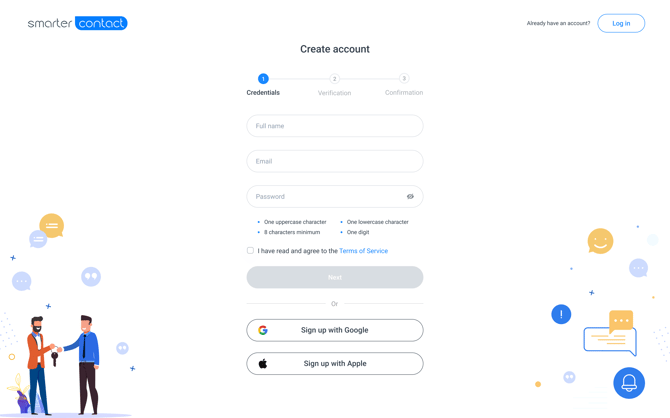
- Go to the Sign-Up Page: Navigate to the Smarter Contact registration page.
-
Register: Enter your email address or sign up instantly using your Google Credentials.
-
Validate & Launch: Click Sign Up, check your inbox for the verification link, and click to confirm your account.
Part 2: Locking in the Savings (Pay Over Time)
After confirming your email, you will need to navigate to Membership page. This is where you secure your flexible payment option.
💳 Pay Your Way, Scale Your Way
We’ve partnered with Affirm to give you the best of both worlds: the savings of a yearly commitment with the flexibility of monthly payments. This helps you invest in high-volume sending and advanced automation without tying up your capital.
1. Add a Payment Method: You must first add a credit card to your account to enable the BNPL option at checkout.
2. Select the Plan: Choose the Yearly Enterprise plan option.
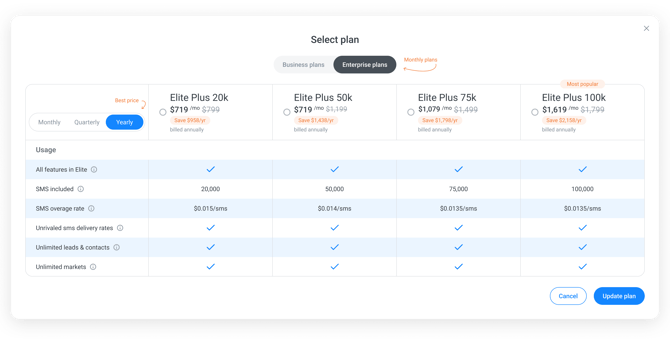
Benefit: You lock in the Yearly rate, saving you up to $2,159 per year.
3. Choose Affirm at Checkout: Instead of one lump sum, select the Affirm option at checkout.
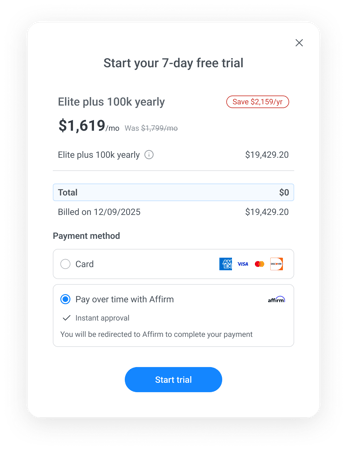
4. Launch: Complete the easy Affirm process to split the cost into manageable monthly installments.
You’ve set yourself up for maximum savings and success. Now go close those deals—and remember: Our expert support team is always ready to help you every step of the way.
🚀 Coming Soon...
We are cooking up some massive updates for the end of the year. Here is what’s on the menu:
-
We’re heads-down building the future. Smarter Contact 3.0 is coming, and it changes everything 😲
With 💙,
Smarter Contact Team