---
title: Skiptracing Overview
description: Learn how to use Smarter Contact's built-in skiptracing tool to turn a raw property list into verified, reachable contacts — without leaving your CRM.
---
[](https://smartercontact.com/)
☰
Solutions
- [Real Estate Investing](https://smartercontact.com/real-estate-investing/)
- [Real Estate Agent](https://smartercontact.com/real-estate-agent/)
- [General Sales/Marketing](https://smartercontact.com/general-sales-marketing/)
- [Automotive](https://smartercontact.com/automotive/)
- [Event Promotion](https://smartercontact.com/event-promotion/)
- [Gym/Fitness](https://smartercontact.com/gym-fitness/)
- [Staffing](https://smartercontact.com/staffing/)
Features
- [Texting Automation](https://smartercontact.com/sms-automation/)
- [Calling](https://smartercontact.com/calling/)
- [Reporting](https://smartercontact.com/reporting/)
- [Built-in CRM](https://smartercontact.com/built-in-crm/)
- [Custom Campaigns](https://smartercontact.com/custom-campaigns/)
- [Calendar](https://smartercontact.com/calendar/)
- [Integrations](https://smartercontact.com/integrations/)
[Pricing](https://smartercontact.com/pricing/)
Resources
- [Launch Control vs Smarter Contact](https://smartercontact.com/launch-control-vs-smarter-contact/)
- [Smarter Contact Managed](https://smartercontact.com/managed-plans/)
- [Our Team](https://smartercontact.com/our-team/)
- [Tutorials](https://smartercontact.com/tutorials/)
- [Our Story](https://smartercontact.com/our-story/)
- [Help Center](https://support.smartercontact.com/?hsLang=en)
- [Blog](https://smartercontact.com/blog/)
[Affiliate Program](https://lp.smartercontact.com/affiliates) [Dialer](https://smartercontact.com/dialer/)
[Log in](https://app.smartercontact.com/login) [Get started now](https://app.smartercontact.com/signup)
[Skip to content](https://support.smartercontact.com/skiptracing-overview#main-content)

Open main navigation
Close main navigation
- [Go to App](https://app.smartercontact.com/?utm_source=knowledge_base)
[Go to App](https://app.smartercontact.com/?utm_source=knowledge_base)
How can we help you?
- There are no suggestions because the search field is empty.
1. [Help Center](https://support.smartercontact.com/?hsLang=en)
2. [Manage Contacts](https://support.smartercontact.com/manage-contacts?hsLang=en)
June 16, 2026
# Skiptracing Overview
## Turn Raw Data Into Reachable Contacts
A campaign is only as good as the data feeding it. Smarter Contact's built-in skiptracing tool turns a raw property list into a set of real, reachable contacts — verified phone numbers, emails, addresses, and more — without ever leaving the platform or paying a separate provider.
### What Is Skiptracing in Real Estate?
**Skiptracing** is the process of finding current contact information for a person using identifying data like their name and property address. For real estate investors, it's how you turn a list of property owners or landlords into a callable, textable lead list. Smarter Contact runs skiptracing directly inside the CRM, so the results land in your database and are ready to contact immediately.
### What Data Does Skiptracing Return?
When a record is successfully matched, Smarter Contact returns up to five data categories per lead:
- **Phone numbers** — multiple numbers associated with the individual, sorted by Mobile and Landline
- **Email addresses**
Where available, results also include **APNs (Assessor Parcel Numbers)** and **parcel details** for the properties you submit. Your results dashboard shows a full breakdown — total contacts returned, hit rate, and every number categorized by type.
A successful match is counted as a "Hit" when at least one of these data points is returned.
### How to Skiptrace a File
#### Step 1: Upload Your File
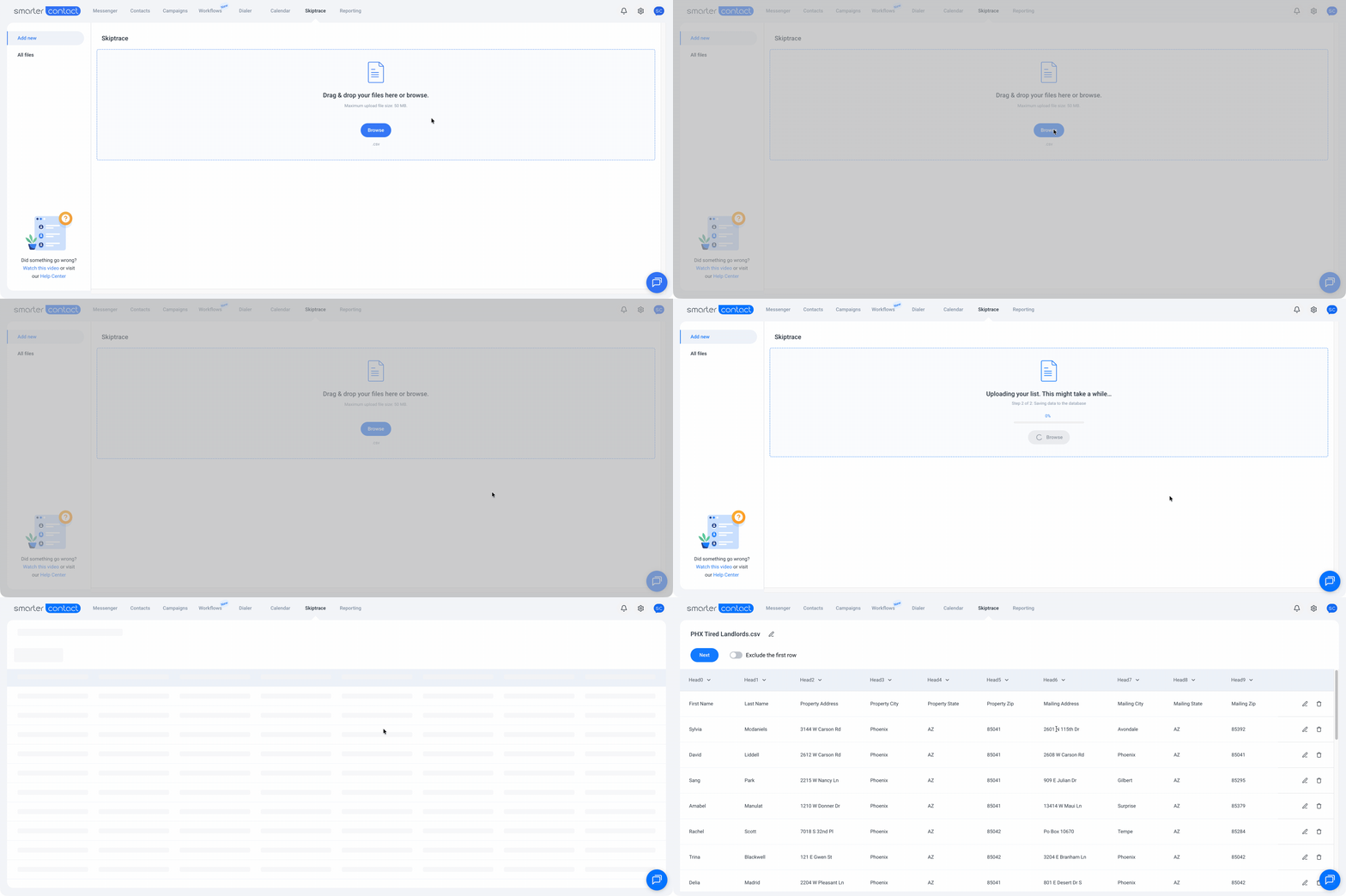
Navigate to the **Skiptrace** tab and upload your lead list. You can drag the file directly into the upload box or browse your device to find it.
##### File requirements:
- Format: .csv only
- Maximum file size: 50 MB
- Required fields: First Name, Last Name, and at least one address (Property or Mailing) — including City, State, and Zip
💡 **Pro tip:** If your file has both a Property Address and a Mailing Address, map both. Using both consistently improves your hit rate.
#### Step 2: Map Your Fields
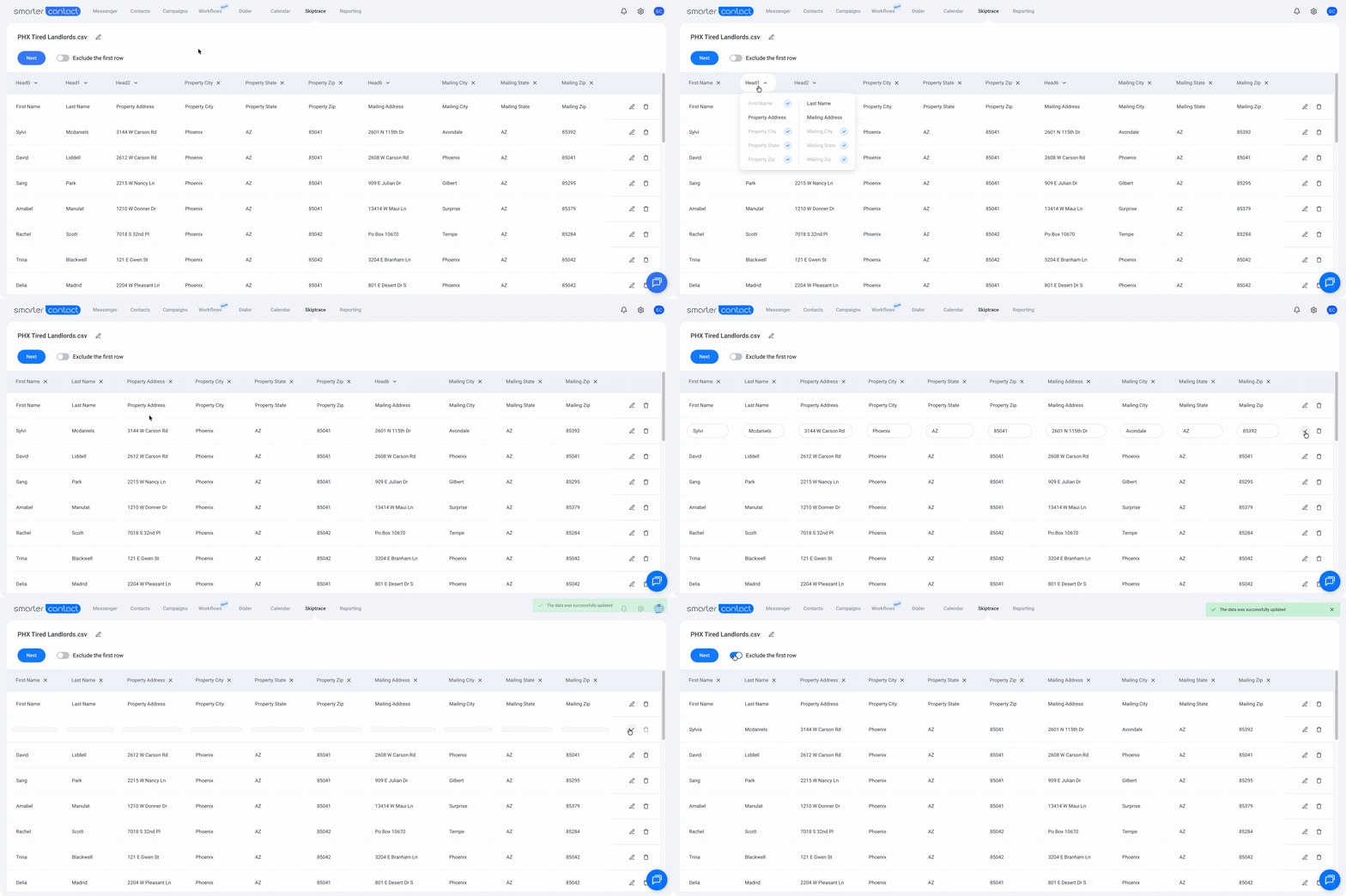
Once your file is uploaded, map the columns in your spreadsheet to the corresponding fields in Smarter Contact. The three required fields — First Name, Last Name, and Address — must be mapped before you can proceed.
A few things worth knowing at this step:
- **Map both Property and Mailing addresses** when available — using both consistently returns more matches than either address alone
- **Keep your data clean** — each column should contain exactly what it says. A First Name field with a full name, an LLC, or anything other than a first name will produce an invalid match
- **Remove blank rows and bad data before uploading** — LLCs, trust names, or corrupted entries won't match against real people and will count against your results
- **Toggle Exclude the first row** if your spreadsheet's first row is a header rather than a lead record
- **Edit or delete individual rows** directly in the mapping view if you spot issues before submitting
- Minimum list size is **5 records**
#### Step 3: Review Pricing and Confirm
Before the skiptrace runs, a payment summary shows you the number of records, the price per record, and your estimated total. Enable **Dedupe previously skiptraced records** to automatically remove anyone you've already traced — the system cross-references your entire history and skips the duplicates. The more you skiptrace over time, the more this saves you.
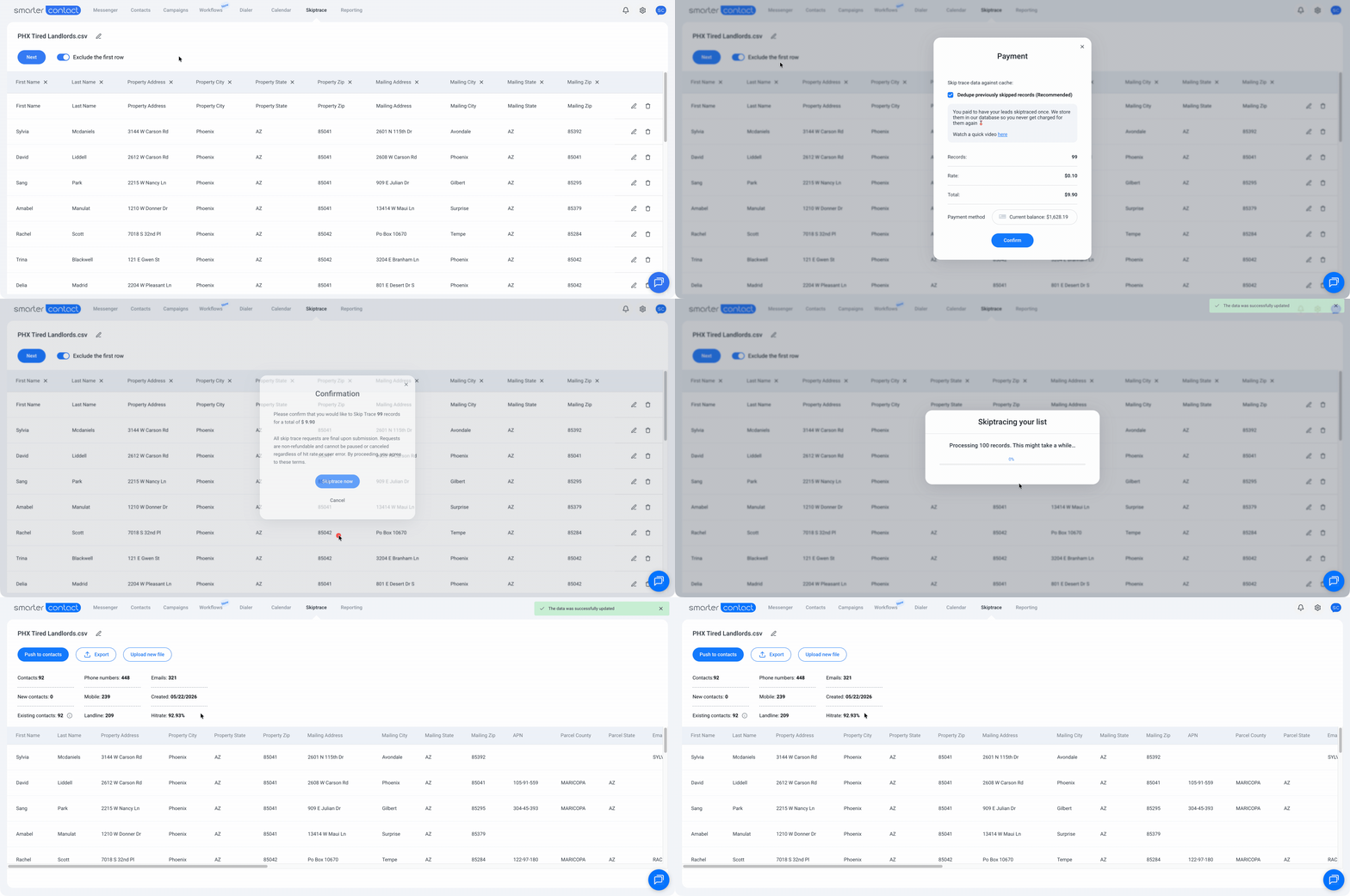
One important detail on billing: the upfront charge is based on your total list size, but **you're only billed for successful hits**. Any record the system can't match is returned to your balance automatically — so you never pay for data you don't receive.
Once you confirm, the skiptrace runs and a progress bar tracks the process in real time. When it's done, a confirmation email with your results file and payment receipt lands in your inbox, and your final cost is deducted from your Smarter Contact balance.
#### Skiptracing Pricing
Pricing scales with your plan — the higher your tier, the lower your per-record cost.
| Plan | Price per Record |
| --- | --- |
| No plan / Inactive | $0.20 |
| Starter | $0.15 |
| Pro | $0.12 |
| Elite / Elite Plus | $0.10 |
Skiptracing is available during the 7-day free trial at the rates above. Note that trial users are charged real costs for skiptracing — it is not included as part of the free trial experience.
#### Managing Your Skiptraced Files
Once your skip trace is complete, you have three options:
- **Push to Contacts** — send the entire enriched list to your Smarter Contact database in one click and move straight into a campaign
- **Export the file** — download your results if you need them elsewhere
- **Run a new upload** — start another skip trace whenever you're ready
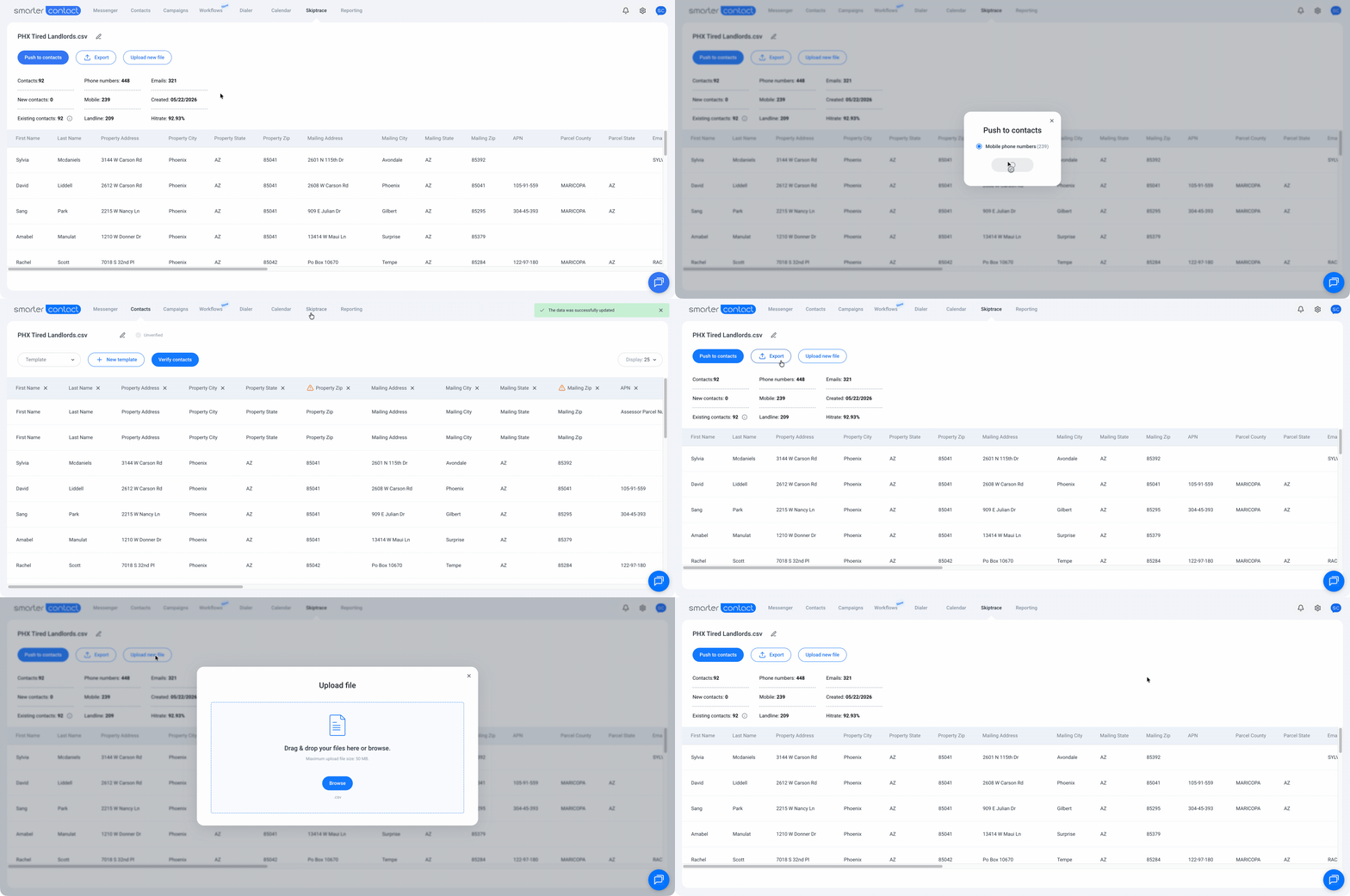
The **All Files** tab shows every list you've previously skiptraced, including a breakdown of total phone numbers returned, how many are mobile, and how many are landline. You can delete any file from this view when you no longer need it.
### Frequently Asked Questions
- **Can I avoid being charged twice for the same lead?**
Yes — enable **Dedupe previously skiptraced records** at checkout. Keep your column mapping consistent across uploads, because the system identifies duplicates based on the data points you map. A different column mapped for the same lead means a new charge.
- **What happens after the skiptrace is complete?**
A confirmation email with your results file and payment receipt lands in your inbox automatically. Your final cost — hits only — is deducted from your balance.
- **Is skiptracing available during the free trial?**
Yes, but real charges apply. A warning appears before you confirm any run during your trial period.
### What's Next?
Once your list is skiptraced and your leads have verified phone numbers, the next step is putting them into a campaign. Learn how to build drip sequences that reach out automatically — at the right time, with the right message.
[Explore Drip Campaigns →](https://support.smartercontact.com/drip-campaigns-overview?hsLang=en)
##### The Smarter Contact Team
- [Contact Us](https://smartercontact.com/contact-us/)
[](http://smartercontact.com)
###### ###### [Product](https://smartercontact.com/pricing/)
[Messaging Plans](https://smartercontact.com/messaging-plan/)
[Calling Plans](https://smartercontact.com/calling-plan/)
[Mobile App](https://smartercontact.com/mobile/)
[What’s New](https://smartercontact.com/whats-new/)
[Pricing](https://smartercontact.com/pricing/)
###### Company
[Privacy Policy](https://smartercontact.com/privacy-policy/)
[Terms & Conditions](https://smartercontact.com/terms-and-conditions/)
[mailto:support@smartercontact.com](mailto:support@smartercontact.com)
Copyright © 2026, Smarter Contact
#### Product
- [Messaging Plans](https://smartercontact.com/messaging-plan/)
- [Calling Plans](https://smartercontact.com/calling-plan/)
- [Mobile App](https://smartercontact.com/mobile/)
- [What’s New](https://smartercontact.com/whats-new/)
- [Pricing](https://smartercontact.com/pricing/)
#### Company
- [Privacy Policy](https://smartercontact.com/privacy-policy/)
- [Terms & Conditions](https://smartercontact.com/terms-and-conditions/)
#### Solutions
- [Investors](https://smartercontact.com/real-estate-investors/)
- [Agents](https://smartercontact.com/real-estate-agents/)
- [Brokers](https://smartercontact.com/real-estate-brokers/)
- [Wholesalers](https://smartercontact.com/real-estate-wholesalers/)
- [Land Flippers](https://smartercontact.com/real-estate-land-flippers/)
- [Fix and Flippers](https://smartercontact.com/real-estate-fix-and-flippers/)
- [Land Developers](https://smartercontact.com/real-estate-land-developers/)
- [Property Developers](https://smartercontact.com/real-estate-property-developers/)
#### Comparison
- [Launch Control vs Smarter Contact](https://smartercontact.com/launch-control-vs-smarter-contact/)
- [Batch Leads vs Smarter Contact](https://smartercontact.com/batch-leads-vs-smarter-contact/)
- [Lead Sherpa vs Smarter Contact](https://smartercontact.com/lead-sherpa-vs-smarter-contact/)
- [ReplySmart vs Smarter Contact](https://smartercontact.com/replysmart-vs-smarter-contact/)
- [ZeitBlast vs Smarter Contact](https://smartercontact.com/zeitblast-vs-smarter-contact/)
- [Sendivo vs Smarter Contact](https://smartercontact.com/sendivo-vs-smarter-contact/)
- [HighLevel vs Smarter Contact](https://smartercontact.com/highlevel-vs-smarter-contact/)
- [XLeads vs Smarter Contact](https://smartercontact.com/xleads-vs-smarter-contact/)
- [ReadyMode vs Smarter Contact](https://smartercontact.com/readymode-vs-smarter-contact/)
- [BatchDialer vs Smarter Contact](https://smartercontact.com/batchdialer-vs-smarter-contact/)
- [PhoneBurner vs Smarter Contact](https://smartercontact.com/phoneburner-vs-smarter-contact/)
- [Roor vs Smarter Contact](https://smartercontact.com/roor-vs-smarter-contact/)
#### Resources
- [Tutorials](https://smartercontact.com/tutorials/)
- [Help Center](https://support.smartercontact.com/?hsLang=en)
- [Careers](https://smartercontact.hurma.work/public-vacancies)
[](https://smartercontact.com)
[](https://apps.apple.com/us/app/smarter-contact/id1637673379) [](https://play.google.com/store/apps/details?id=com.smartercontactapp&pli=1)
© 2026 Copyright Smarter Contact.
All Rights Reserved.
```json
{
"@context" : "https://schema.org",
"@type" : "VideoObject",
"caption" : {
"@type" : "MediaObject",
"contentUrl" : "https://support.smartercontact.com/media-transcripts/213415036835/en.vtt",
"inLanguage" : "en",
"name" : "en Captions"
},
"contentUrl" : "https://21860142.fs1.hubspotusercontent-na1.net/hubfs/21860142/video_assets/213415036835/inherited/web_optimized.mp4",
"dateModified" : "2026-05-22T14:23:53.916Z",
"duration" : "PT2M38S",
"height" : 1080,
"name" : "Skiptracing",
"thumbnailUrl" : "https://support.smartercontact.com/hubfs/Skiptracing.mp4/medium.jpg",
"uploadDate" : "2026-05-22T14:22:56.117Z",
"width" : 1920
}
```