

The right follow-up at the right time wins conversations. Smarter Contact 1.10 puts scheduling in your pocket. The app opens faster, deleting is clearer, and message and call alerts now play a sound on iPhone.
🗓️ Schedule follow-ups from the chat
Plan your next message while you’re away from your desk. Pick the time once, then move on to the next conversation.
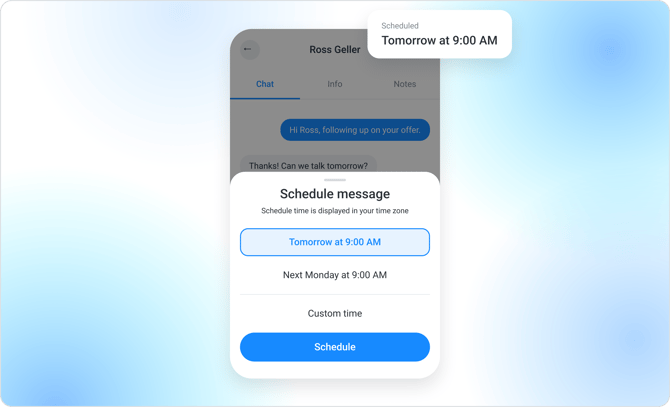
- Press and hold Send: Hold Send in a chat to schedule your message.
- Pick your time: Choose tomorrow at 9:00 AM, next Monday at 9:00 AM, or any date up to 5 years ahead.
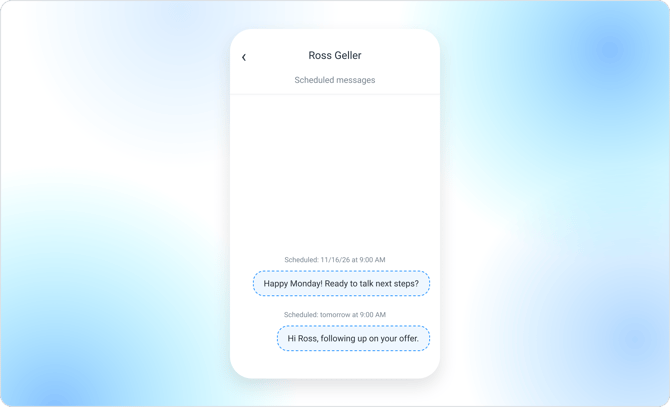
- See what’s queued: Scheduled messages appear right in the chat. Long-press one to copy or delete it.
- Web schedules included: Messages you scheduled on the web show up too. Pull down to refresh if you don’t see them yet.
⚡ Get to your chats faster
When a reply is waiting, every second of loading counts.
- Faster start: The app opens straight to your chats sooner.
- Snappier chats: Tabs, lists, and buttons respond quicker, so you spend more time messaging.
🗑️ Delete with confidence
Know what leaves before you remove it.
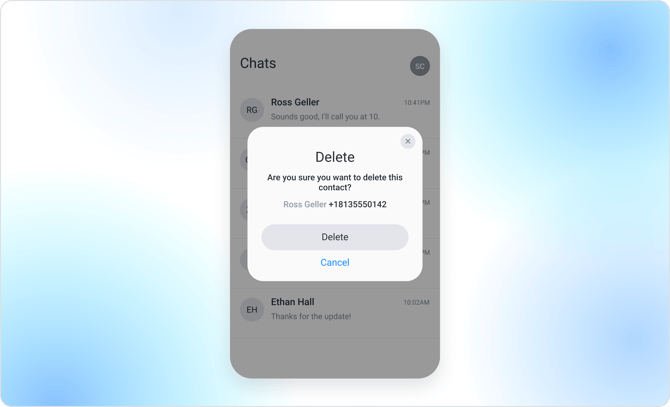
- Clear details: Deleting a conversation now shows the contact’s name and phone number.
- Heads up, the contact goes too: The contact is deleted along with the conversation.
- Find it later: The conversation stays in Deleted.
🔔 Small fixes that add up
- Hear it on iPhone: Message and call alerts now play a sound.
- Support, already signed in: Support chat opens with you signed in, so you can ask your question right away.
- Know why Call is off: When Call is unavailable, a note now tells you why.
- Android back: Back returns you one screen.
- Samsung fix: On Samsung phones with the newest Android, the call-permission prompt no longer closes the app.
👉 Get the update now
Download version 1.10 from the App Store or Google Play.
With 💙,
Smarter Contact Team