

You've got a motivated seller on the line. The last thing you need is a broken message before the call or a dropped connection during it. Small things that cost you leads. With 3.15, you can stop worrying about both.
✅ Catch Custom Field Typos Before You Send
A misspelled custom field means your lead gets a broken message. That's a bad first impression you can't take back.
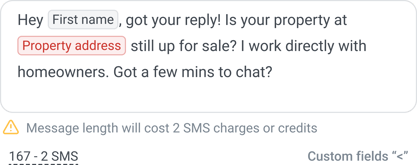
Now, valid custom fields stand out in Messenger, campaigns, templates, quick replies, call scripts, voicemail and workflows. Invalid ones are highlighted in red, with a hover tip explaining why. Even better, type < and pick the right field from the list instead of guessing the spelling.
Every outbound text, exactly how you meant it.
🎧 Hear Every Word

Your calls now sound better automatically. We've added a Call quality setting and switched every account to Auto, so you get the clearest audio your connection can handle without lifting a finger.
Want to change it? Go to Settings, then General settings, then Call quality, and choose Low, Auto, or High. It applies to every call you make, 1:1 and dialer, and your very next call picks it up. If your internet is slow, choose Low to keep the call steady. If you're on a strong connection, choose High for the crispest audio possible.
Clearer calls. Better conversations. More deals.
🔌 Stay on the Call
Wi-Fi drops happen. Losing the lead shouldn't.
If your connection blips, your call now reconnects automatically. No redialing, no awkward "sorry, you cut out." The call button and the dialer Online switch also show exactly what's happening, with tooltips that tell you when you're connecting and when something needs your attention. And while a 1:1 call is active, the call button stays locked until you wrap it up, so you'll never accidentally dial two leads at once.
Say goodbye to silent call failures.
🔢 Get Past the Phone Menu
"Press 1 for an agent" no longer stops your dialer campaign.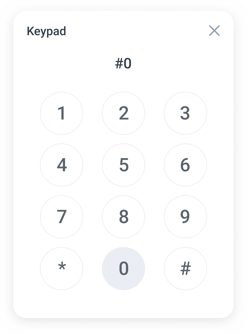
Press digits on any active dialer call to navigate IVRs, reach extensions, and get to the right person. It works exactly like the keypad on your 1:1 calls.
Every outbound text, exactly how you meant it.
📋 Get a Head Start on Registration
Submitted your Brand registration? You don't have to sit and wait. Place 1:1 calls on your messaging numbers while your brand is in review, and buy more 10DLC numbers from Messaging campaign setup so they're ready the moment you're approved.
🚀 What's Coming Next
We're just getting started. Here's what's on the way:
Web
- SI agent that drafts replies for you in Messenger
- Push contacts from Messenger to campaigns, groups, and the dialer
- Export conversations to CSV or your CRM
- Keep calls going while you work in other browser tabs
- Faster, clearer signup and login
Mobile
- Schedule a message from your phone
- Faster app start-up
- Smoother scrolling and tab switching
You're on the platform that keeps getting better, release after release!
🗺️ Your feedback = our roadmap
Most of what we ship starts with something a customer told us. Want to shape what comes next? Book a quick call with our product team, or send us a message anytime.
[Book time with our product team →]
Need help with something now? Click the chat bubble in the bottom-right corner or email support@smartercontact.com
With 💙,
The Smarter Contact Team