

In the past, testing an SMS platform meant waiting days for 10DLC approval and buying phone numbers before you could send a single text.
We fixed that. With the Interactive Trial, you enter a high-fidelity Simulation Sandbox. You can launch campaigns, manage replies, and test the messaging interface immediately using simulated data—without needing to submit your brand registration first.
What is the Simulation Sandbox?
Think of it as a flight simulator. You get to fly the plane, but you can’t crash.
For 7 Days, you have access to the core messaging features populated with realistic, but entirely simulated data. This allows you to see exactly how the software handles volume and manages replies without interacting with the real world.
Everything You Get (Free & Instant)
-
3 Pre-Loaded Phone Numbers: You will see three numbers in your account ready to use.
Note: These are virtual test numbers only. They are not registered with carriers and cannot send messages to real phones.
-
1,000 Simulation Credits: You get a virtual balance to "pay" for your test campaigns.
-
Simulated Replies: When you launch a campaign, you won't reach real people. Instead, our system generates realistic simulated replies (e.g., "Interested," "Stop," "Who is this?") so you can practice using our Inbox, Labels, and filtering tools.
-
Pre-Loaded Templates: We include example templates to get you started quickly.
Live vs. Simulated: The Rules of the Road
While the messaging experience is in "Sandbox Mode" (Free), there are specific rules about what is simulated and what is live.
-
SMS Campaigns (Simulated)
Messages are processed by our engine. No texts are sent to real phones. Cost: $0.00. -
Phone Numbers (Simulated)
You use our pool of test numbers. You cannot keep these numbers when you end the trial. Cost: $0.00. -
Skiptracing (Live Data)
This is live. If you skiptrace a contact, you get real data and will be charged from your account balance.
Note on Skiptracing: We believe in giving you access to real tools. Since skiptracing provides actual data on real people, it incurs real costs. You will see a clear confirmation popup before any charge occurs.
Welcome to your trial
1. Upload Contacts
One thing to do before you launch: upload your contact list.
- Go to Contacts.
- Click Upload.
- Drag in your file, or click Browse to select it. Only CSV files are supported.
- Click Next.
- Click the header above each column and pick the matching field. Map First Name, Last Name, and Phone at minimum.
- Click Apply.
- Choose your filtering options, then click Apply again.
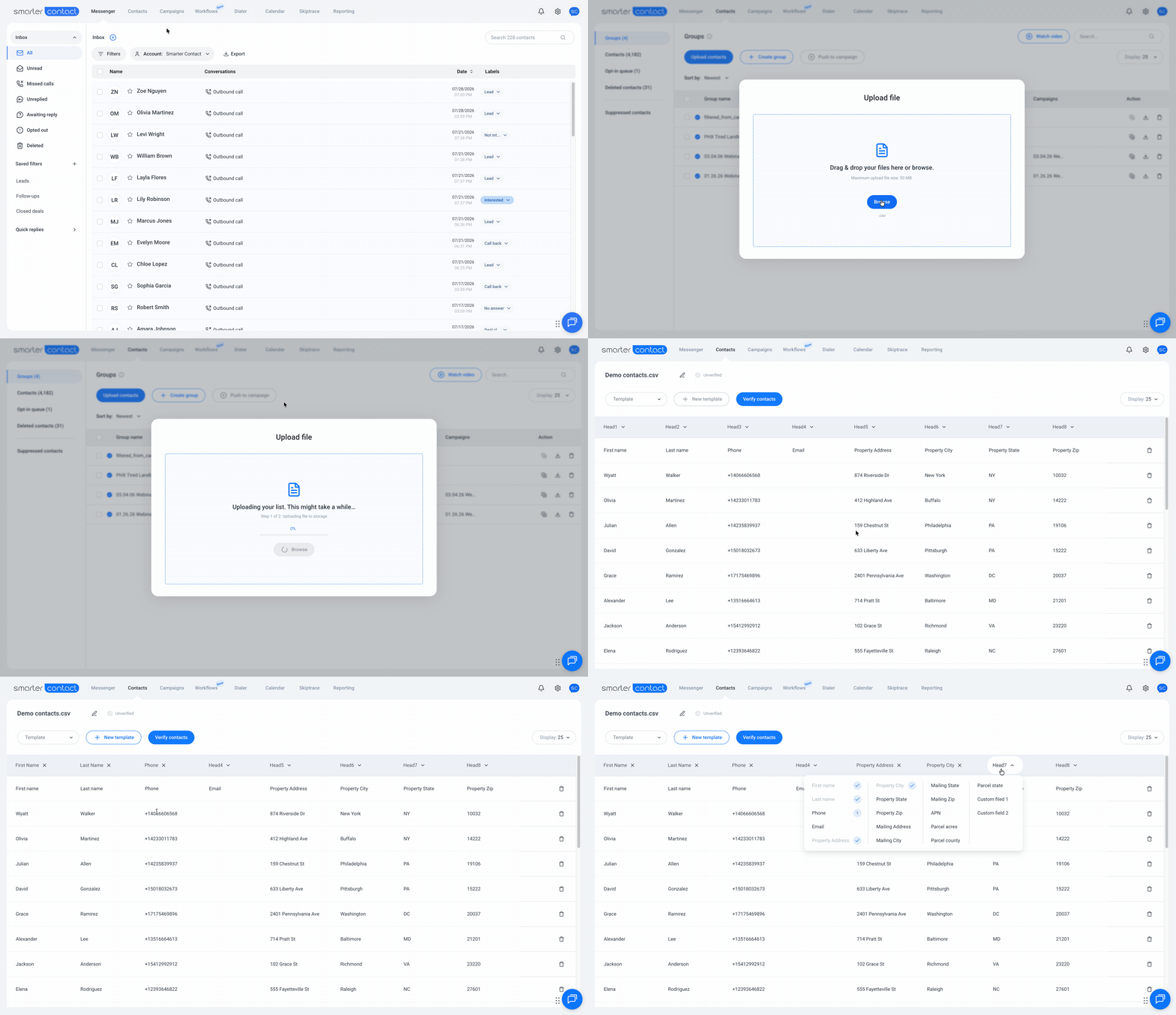
Your list is scrubbed automatically. Invalid numbers come out before you send a single message, and a blue checkmark appears next to your group once it is ready to use.
More detail: Managing Contacts
2. Create a Campaign
Campaigns are the heart of Smarter Contact. Every conversation, every reply, and every deal starts here. This is where your contact list, your message, and your phone numbers come together into personalized engagement at scale.
Start with your message. Every campaign runs on a Message Template, the SMS your leads receive. A sample is already in your account, so you can skip straight to launching. To write your own:
- Go to Campaigns.
- Open Message Templates.
- Click Add New Template.
- Give it a name. Keep it under 20 characters and make it unique.
- Write your message. Personalize it with fields like First Name and Property Address.
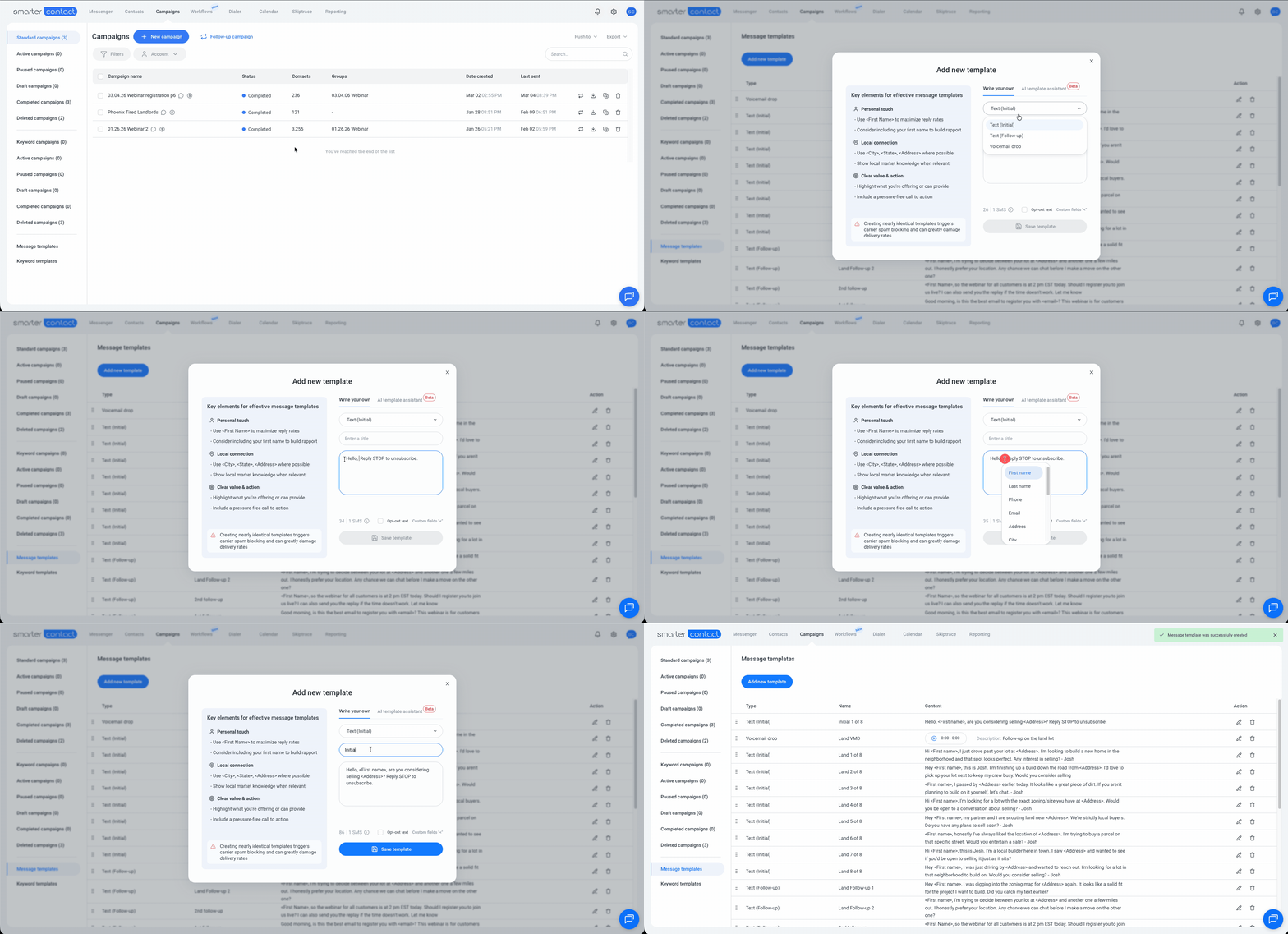
Keep the message within 160 characters, including the "Reply STOP to unsubscribe." opt-out text.
More detail: Message Templates
Then launch.
- Go to Campaigns.
- Click New Campaign, then select Standard campaign.
- Name your campaign.
- Select your verified contact group. Only groups with a blue checkmark can be selected.
- Choose your message template.
- Pick your phone numbers.
- Click Send campaign and confirm.
Your first campaign is live.
More detail: Creative Effective Drip-Campaigns
3. Messenger
Within a few moments, your Messenger starts filling with replies like "Interested," "Stop," and "Who is this?" They are simulated, and they behave exactly like live ones.
This is where deals actually get worked, so spend ten minutes here:
- Open a conversation and send a reply.
- Apply a label so you can find that lead again in one click.
- Filter your conversations by Unread, Unreplied, or Opted Out.
Then open Reporting to see what your campaign did: messages delivered, replies received, and how each template and phone number performed. This is the view our customers check every morning to decide which message to send more of.
More detail: Messenger Overview and Reporting page overview
The Seamless Handoff (Trial to Paid)
We designed the trial so you don't have to do the work twice. When your 7 days are up (or you click "End Trial" to go live), we automatically clean up the "test" data and keep your actual work.
What We Keep (Your Work)
-
Your Account Setup: All your Labels, Custom Fields, and Settings.
-
Your Content: Any Custom Templates you created yourself.
-
Your Contacts: Any Real Contact Lists you uploaded.
What We Sweep (The Simulation)
-
The Test Numbers: The 3 simulated numbers are removed.
-
The Fake Data: We wipe all simulated message history, campaign stats, and simulated replies so your dashboard is spotless for your first real campaign.
Note: During the trial, the Brand Registration (10DLC) page is hidden so you can focus on testing the software. Once you activate your full subscription, the page unlocks, and you can submit your brand for real carrier approval.
Limitations to Know
To ensure the system remains secure and focused on core messaging, some advanced features are locked until you upgrade:
-
Workflows: Automation/Workflows are disabled during the trial.
-
Sub-Accounts: You cannot create team sub-accounts until the subscription is active.
-
Advanced Tools: API Integrations, Scheduled Campaigns, and Voicemail Drops are disabled.
- No Calling Plans: You cannot mix a "Simulated" SMS trial with a "Live" Dialer plan. Buying a Dialer plan ends the simulation immediately.
Ready to Launch?
You are 30 seconds away from your first simulated campaign.
-
Select your Messaging Plan.
-
Enter Payment Details (You won't be charged for the subscription until Day 7).
-
Start Sending.
Start Your Interactive Trial Now
With 💙,
Smarter Contact Tea