---
title: What is a Sub Account and How Does it Work?
description: Sub accounts let you manage multiple users or clients from one main account, without sharing credentials or mixing data.
---
[](https://smartercontact.com/)
☰
Solutions
- [Real Estate Investing](https://smartercontact.com/real-estate-investing/)
- [Real Estate Agent](https://smartercontact.com/real-estate-agent/)
- [General Sales/Marketing](https://smartercontact.com/general-sales-marketing/)
- [Automotive](https://smartercontact.com/automotive/)
- [Event Promotion](https://smartercontact.com/event-promotion/)
- [Gym/Fitness](https://smartercontact.com/gym-fitness/)
- [Staffing](https://smartercontact.com/staffing/)
Features
- [Texting Automation](https://smartercontact.com/sms-automation/)
- [Calling](https://smartercontact.com/calling/)
- [Reporting](https://smartercontact.com/reporting/)
- [Built-in CRM](https://smartercontact.com/built-in-crm/)
- [Custom Campaigns](https://smartercontact.com/custom-campaigns/)
- [Calendar](https://smartercontact.com/calendar/)
- [Integrations](https://smartercontact.com/integrations/)
[Pricing](https://smartercontact.com/pricing/)
Resources
- [Launch Control vs Smarter Contact](https://smartercontact.com/launch-control-vs-smarter-contact/)
- [Smarter Contact Managed](https://smartercontact.com/managed-plans/)
- [Our Team](https://smartercontact.com/our-team/)
- [Tutorials](https://smartercontact.com/tutorials/)
- [Our Story](https://smartercontact.com/our-story/)
- [Help Center](https://support.smartercontact.com/?hsLang=en)
- [Blog](https://smartercontact.com/blog/)
[Affiliate Program](https://lp.smartercontact.com/affiliates) [Dialer](https://smartercontact.com/dialer/)
[Log in](https://app.smartercontact.com/login) [Get started now](https://app.smartercontact.com/signup)
[Skip to content](https://support.smartercontact.com/what-is-a-sub-account-and-how-does-it-work#main-content)

Open main navigation
Close main navigation
- [Go to App](https://app.smartercontact.com/?utm_source=knowledge_base)
[Go to App](https://app.smartercontact.com/?utm_source=knowledge_base)
How can we help you?
- There are no suggestions because the search field is empty.
1. [Help Center](https://support.smartercontact.com/?hsLang=en)
2. [Setup](https://support.smartercontact.com/setup?hsLang=en)
July 21, 2026
# What is a Sub Account and How Does it Work?
## Sub accounts let you manage multiple users or clients from one main account, without sharing credentials or mixing data.
### What is a sub account?
A sub account is a secondary account linked to your main account. Each sub account has its own login, credentials, campaigns, and contact lists.
From the main account, you can monitor each sub account's performance individually, tracking campaigns, conversations, and results separately.
This makes it easy to compare performance across users or clients without mixing data. You can also log in to each sub account directly to see exactly what's going on.
This is useful when you need to:
- **Divide work across team members**: each user operates independently without accessing your main account
- **Keep campaigns and lists separate**: no overlap between users or clients
- **Manage everything from one place**: as the primary user, you can view all conversations from your main inbox
For agencies, sub accounts make it possible to manage multiple client accounts under a single platform, keeping each client's data isolated while maintaining full visibility and control.
### What you need to know before getting started
- Sub accounts are available on the **Elite plan and above**
- You get **2 free sub accounts** with Standard A2P 10DLC registration
- Each additional sub account costs **$199/month**
- You can have a maximum of **5 sub accounts**
- Only the primary user can manage billing and add funds
- Each sub account needs its own A2P 10DLC campaign registration under the main account's EIN.
For an overview on how to create and manage sub accounts, please see the following video.
### How to create a sub account
To add a sub account, please follow the steps below:
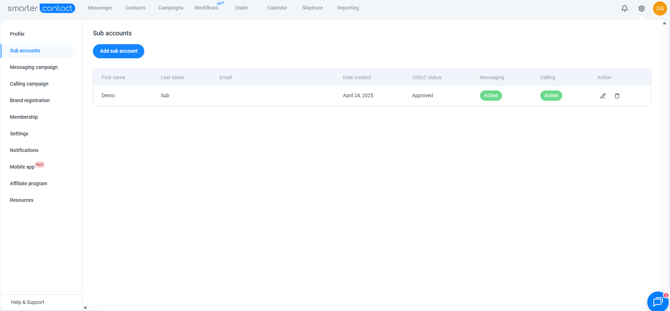
1. Click the gear icon next to your name and go to **Settings**
2. Select **Sub Accounts** and click **Add Sub Account**
1. Fill in the secondary user's information and click **Continue**
**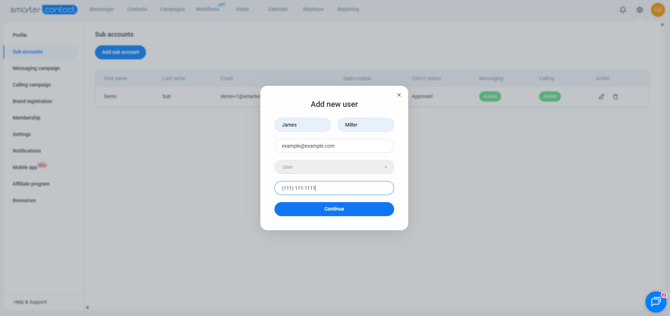**
1. The user will receive a confirmation email to set their password
2. Once confirmed, go back to **Sub Accounts** and set the user's status to **Active**
3. The sub account is ready to use
### How to manage a sub account
You can monitor and manage sub accounts in two main ways: by tracking performance or by reviewing conversations.
#### 1. Track performance (Reporting)
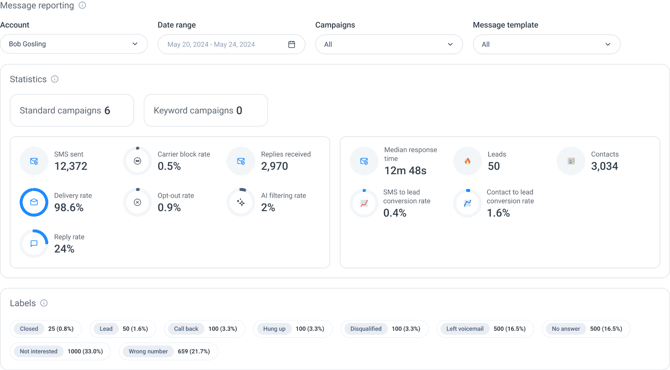
1. Go to the **Reporting** page.
2. Select **Accounts**, then choose the sub account you want to analyze.
3. From here, you can view **Messaging** or **Calling** metrics for that specific sub account.
#### 2. Monitor conversations (Messenger)
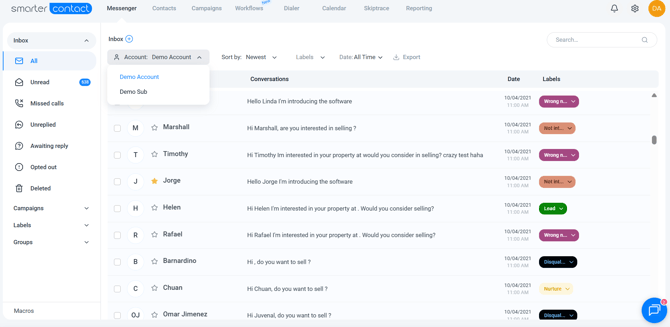
1. Go to the **Messenger**.
2. Use the **account filter** to select the sub account.
3. This allows you to see all conversations happening inside that account in real time.
- [Contact Us](https://smartercontact.com/contact-us/)
[](http://smartercontact.com)
###### ###### [Product](https://smartercontact.com/pricing/)
[Messaging Plans](https://smartercontact.com/messaging-plan/)
[Calling Plans](https://smartercontact.com/calling-plan/)
[Mobile App](https://smartercontact.com/mobile/)
[What’s New](https://smartercontact.com/whats-new/)
[Pricing](https://smartercontact.com/pricing/)
###### Company
[Privacy Policy](https://smartercontact.com/privacy-policy/)
[Terms & Conditions](https://smartercontact.com/terms-and-conditions/)
[mailto:support@smartercontact.com](mailto:support@smartercontact.com)
Copyright © 2026, Smarter Contact
#### Product
- [Messaging Plans](https://smartercontact.com/messaging-plan/)
- [Calling Plans](https://smartercontact.com/calling-plan/)
- [Mobile App](https://smartercontact.com/mobile/)
- [What’s New](https://smartercontact.com/whats-new/)
- [Pricing](https://smartercontact.com/pricing/)
#### Company
- [Privacy Policy](https://smartercontact.com/privacy-policy/)
- [Terms & Conditions](https://smartercontact.com/terms-and-conditions/)
#### Solutions
- [Investors](https://smartercontact.com/real-estate-investors/)
- [Agents](https://smartercontact.com/real-estate-agents/)
- [Brokers](https://smartercontact.com/real-estate-brokers/)
- [Wholesalers](https://smartercontact.com/real-estate-wholesalers/)
- [Land Flippers](https://smartercontact.com/real-estate-land-flippers/)
- [Fix and Flippers](https://smartercontact.com/real-estate-fix-and-flippers/)
- [Land Developers](https://smartercontact.com/real-estate-land-developers/)
- [Property Developers](https://smartercontact.com/real-estate-property-developers/)
#### Comparison
- [Launch Control vs Smarter Contact](https://smartercontact.com/launch-control-vs-smarter-contact/)
- [Batch Leads vs Smarter Contact](https://smartercontact.com/batch-leads-vs-smarter-contact/)
- [Lead Sherpa vs Smarter Contact](https://smartercontact.com/lead-sherpa-vs-smarter-contact/)
- [ReplySmart vs Smarter Contact](https://smartercontact.com/replysmart-vs-smarter-contact/)
- [ZeitBlast vs Smarter Contact](https://smartercontact.com/zeitblast-vs-smarter-contact/)
- [Sendivo vs Smarter Contact](https://smartercontact.com/sendivo-vs-smarter-contact/)
- [HighLevel vs Smarter Contact](https://smartercontact.com/highlevel-vs-smarter-contact/)
- [XLeads vs Smarter Contact](https://smartercontact.com/xleads-vs-smarter-contact/)
- [ReadyMode vs Smarter Contact](https://smartercontact.com/readymode-vs-smarter-contact/)
- [BatchDialer vs Smarter Contact](https://smartercontact.com/batchdialer-vs-smarter-contact/)
- [PhoneBurner vs Smarter Contact](https://smartercontact.com/phoneburner-vs-smarter-contact/)
- [Roor vs Smarter Contact](https://smartercontact.com/roor-vs-smarter-contact/)
#### Resources
- [Tutorials](https://smartercontact.com/tutorials/)
- [Help Center](https://support.smartercontact.com/?hsLang=en)
- [Careers](https://smartercontact.hurma.work/public-vacancies)
[](https://smartercontact.com)
[](https://apps.apple.com/us/app/smarter-contact/id1637673379) [](https://play.google.com/store/apps/details?id=com.smartercontactapp&pli=1)
© 2026 Copyright Smarter Contact.
All Rights Reserved.
```json
{
"@context" : "https://schema.org",
"@type" : "VideoObject",
"caption" : {
"@type" : "MediaObject",
"contentUrl" : "https://support.smartercontact.com/media-transcripts/217642032984/en.vtt",
"inLanguage" : "en",
"name" : "en Captions"
},
"contentUrl" : "https://21860142.fs1.hubspotusercontent-na1.net/hubfs/21860142/video_assets/217642032984/inherited/web_optimized.mp4",
"dateModified" : "2026-07-21T14:08:14.811Z",
"duration" : "PT1M36S",
"height" : 1080,
"name" : "Sub accounts",
"thumbnailUrl" : "https://support.smartercontact.com/hubfs/Sub%20accounts.mp4/medium.jpg",
"uploadDate" : "2026-07-21T14:08:00.608Z",
"width" : 1920
}
```