---
title: How to Integrate Your CRM via Zapier
description: Learn how to integrate Smarter Contact with third-party apps using Zapier. Follow a step-by-step guide or watch a quick tutorial to seamlessly connect your apps. Easily link your Smarter Contact account through the API settings and enhance your workflow efficiency.
---
[](https://smartercontact.com/)
☰
Solutions
- [Real Estate Investing](https://smartercontact.com/real-estate-investing/)
- [Real Estate Agent](https://smartercontact.com/real-estate-agent/)
- [General Sales/Marketing](https://smartercontact.com/general-sales-marketing/)
- [Automotive](https://smartercontact.com/automotive/)
- [Event Promotion](https://smartercontact.com/event-promotion/)
- [Gym/Fitness](https://smartercontact.com/gym-fitness/)
- [Staffing](https://smartercontact.com/staffing/)
Features
- [Texting Automation](https://smartercontact.com/sms-automation/)
- [Calling](https://smartercontact.com/calling/)
- [Reporting](https://smartercontact.com/reporting/)
- [Built-in CRM](https://smartercontact.com/built-in-crm/)
- [Custom Campaigns](https://smartercontact.com/custom-campaigns/)
- [Calendar](https://smartercontact.com/calendar/)
- [Integrations](https://smartercontact.com/integrations/)
[Pricing](https://smartercontact.com/pricing/)
Resources
- [Launch Control vs Smarter Contact](https://smartercontact.com/launch-control-vs-smarter-contact/)
- [Smarter Contact Managed](https://smartercontact.com/managed-plans/)
- [Our Team](https://smartercontact.com/our-team/)
- [Tutorials](https://smartercontact.com/tutorials/)
- [Our Story](https://smartercontact.com/our-story/)
- [Help Center](https://support.smartercontact.com/?hsLang=en)
- [Blog](https://smartercontact.com/blog/)
[Affiliate Program](https://lp.smartercontact.com/affiliates) [Dialer](https://smartercontact.com/dialer/)
[Log in](https://app.smartercontact.com/login) [Get started now](https://app.smartercontact.com/signup)
[Skip to content](https://support.smartercontact.com/zapier-integration#main-content)

Open main navigation
Close main navigation
- [Go to App](https://app.smartercontact.com/?utm_source=knowledge_base)
[Go to App](https://app.smartercontact.com/?utm_source=knowledge_base)
How can we help you?
- There are no suggestions because the search field is empty.
1. [Help Center](https://support.smartercontact.com/?hsLang=en)
2. [Connected Apps](https://support.smartercontact.com/connected-apps?hsLang=en)
October 28, 2026
# How to Integrate Your CRM via Zapier
## Step-By-Step Guide on Integrations
This guide explains how to establish a secure data connection between Smarter Contact and your preferred Customer Relationship Management (CRM) platform using Zapier.
Integrating your CRM ensures data integrity across your tech stack, eliminates manual data entry, and allows your team to push lead information and conversation history directly to your database in real-time.
### Prerequisites
Before beginning the configuration, ensure you have active sessions logged into:
1. Your Smarter Contact account.
2. Your Zapier account.
3. Your destination CRM (e.g., Salesforce, HubSpot, Podio).
### The Setup
#### Step 1: Initiate the Zapier Connection
To establish a secure connection, you initiate the process directly from your Smarter Contact dashboard. No manual API keys are required.

1. Navigate to the **Connect** tab in your Smarter Contact account.
2. Click the **+Add Zapier Integration button**. This will automatically route you to Zapier with the Smarter Contact environment securely pre-loaded.
#### Step 2: Pair Smarter Contact with Your CRM
Once Zapier opens, you will be presented with a pairing view to establish the basic logic of your integration.
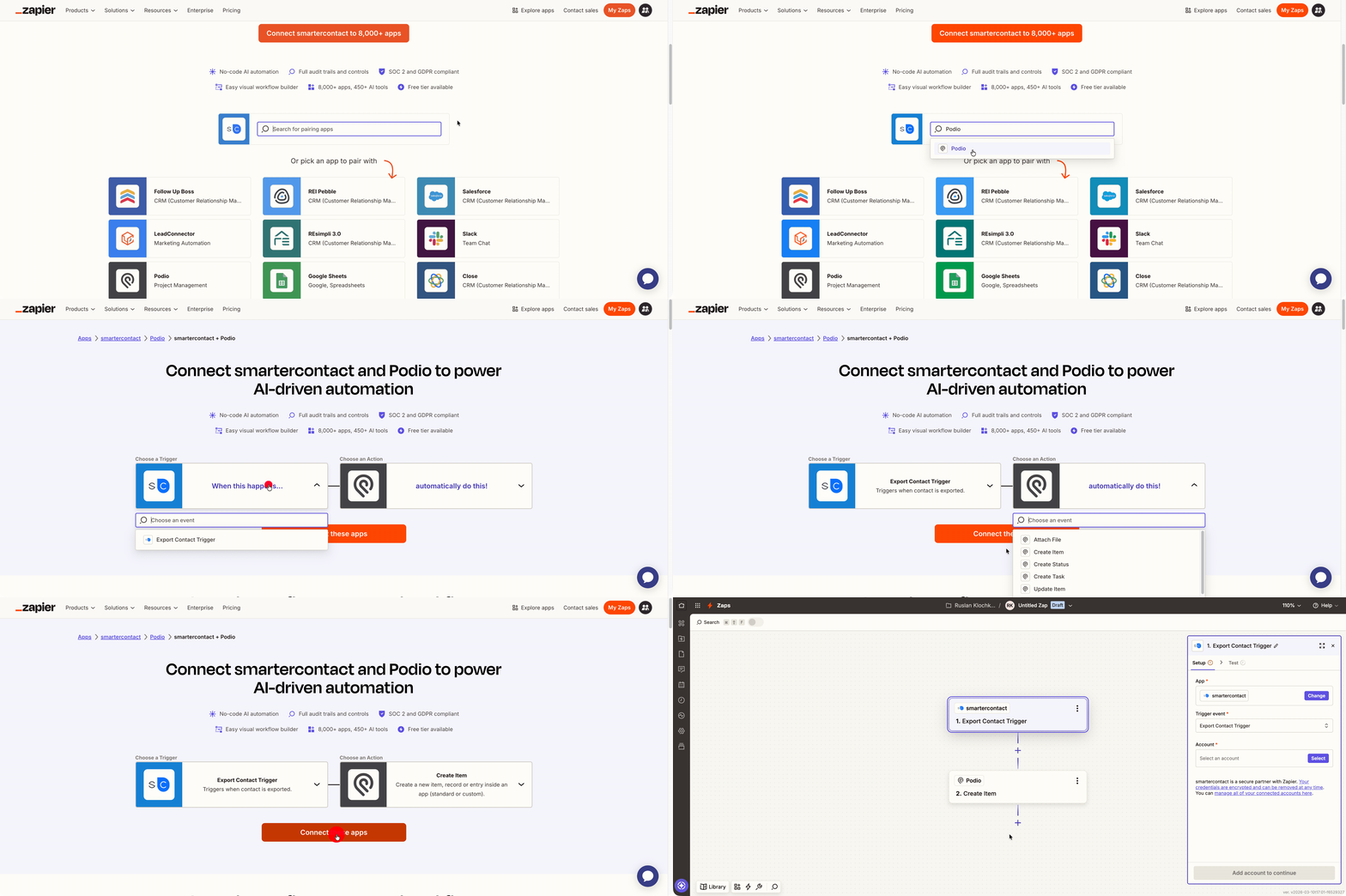
1. In the search bar provided, search for your destination CRM (e.g., Follow Up Boss, Podio).
2. In the pairing view, select the **Trigger** for Smarter Contact. Set this to **Export Contact**.
3. Select the **Action** for your CRM. Set this to your desired outcome, typically **Create Item**, **Create Contact**, or **Update Item**.
4. Click to continue and begin configuring the specific details of the paired applications.
**Note on White-Labeled CRMs:**
If your platform utilizes a universal architecture (such as GoHighLevel or Stride), search for **LeadConnector**. Verify Zapier compatibility with your CRM's support documentation if you are unsure.
#### Step 3: Configure and Authenticate the Trigger
Now, you will authorize the connection starting with Smarter Contact.
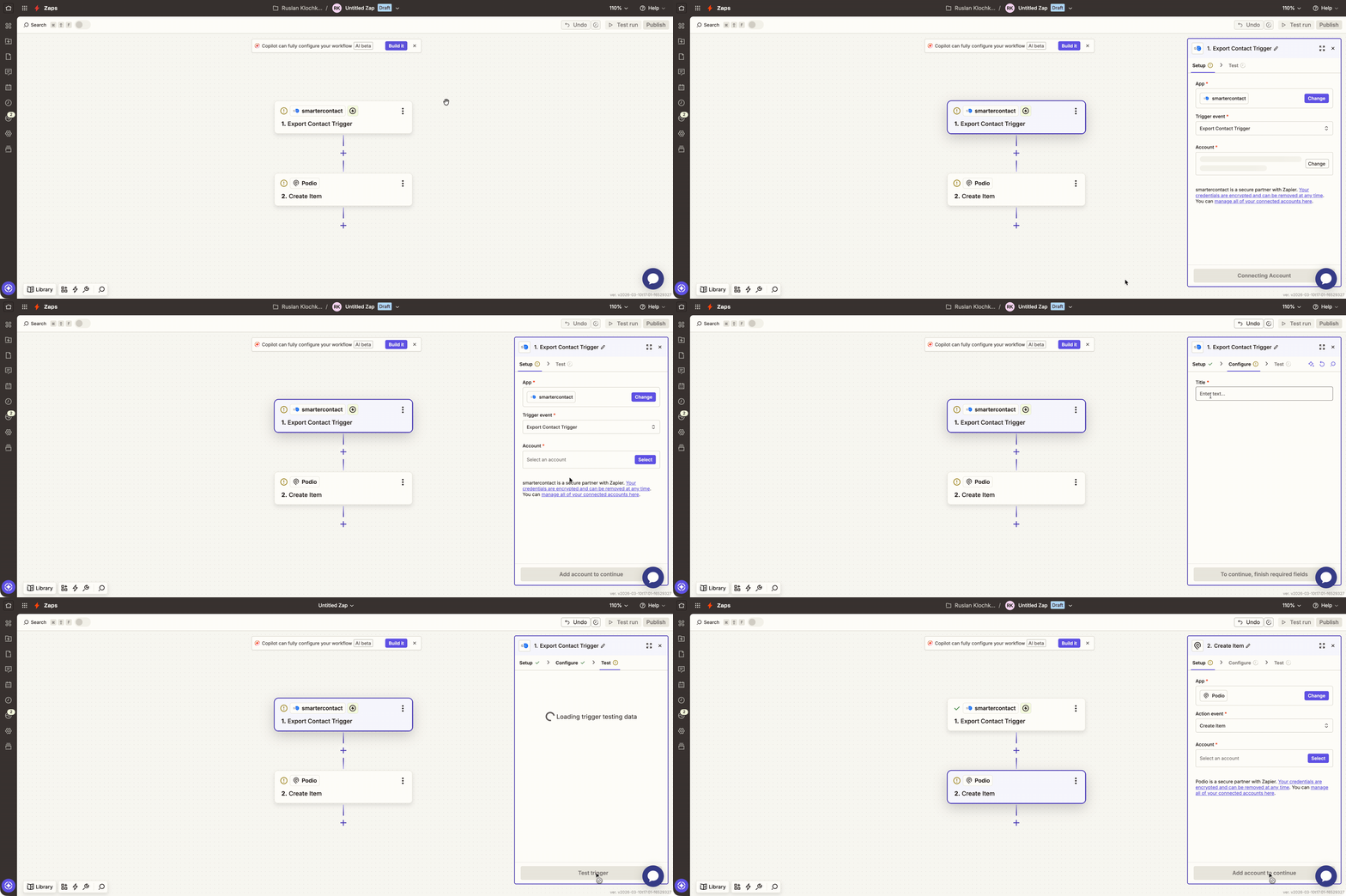
1. Zapier will prompt you to authenticate your Smarter Contact account. Log in through the secure Zapier modal when prompted.
2. Name your trigger (we recommend naming it after your destination CRM to maintain operational clarity).
3. Click **Test Trigger**. Zapier will generate a sample record containing standard data fields. This record is required for mapping data later in the process
#### Step 4: Configure and Authenticate the Action
Next, authorize and configure the destination CRM.
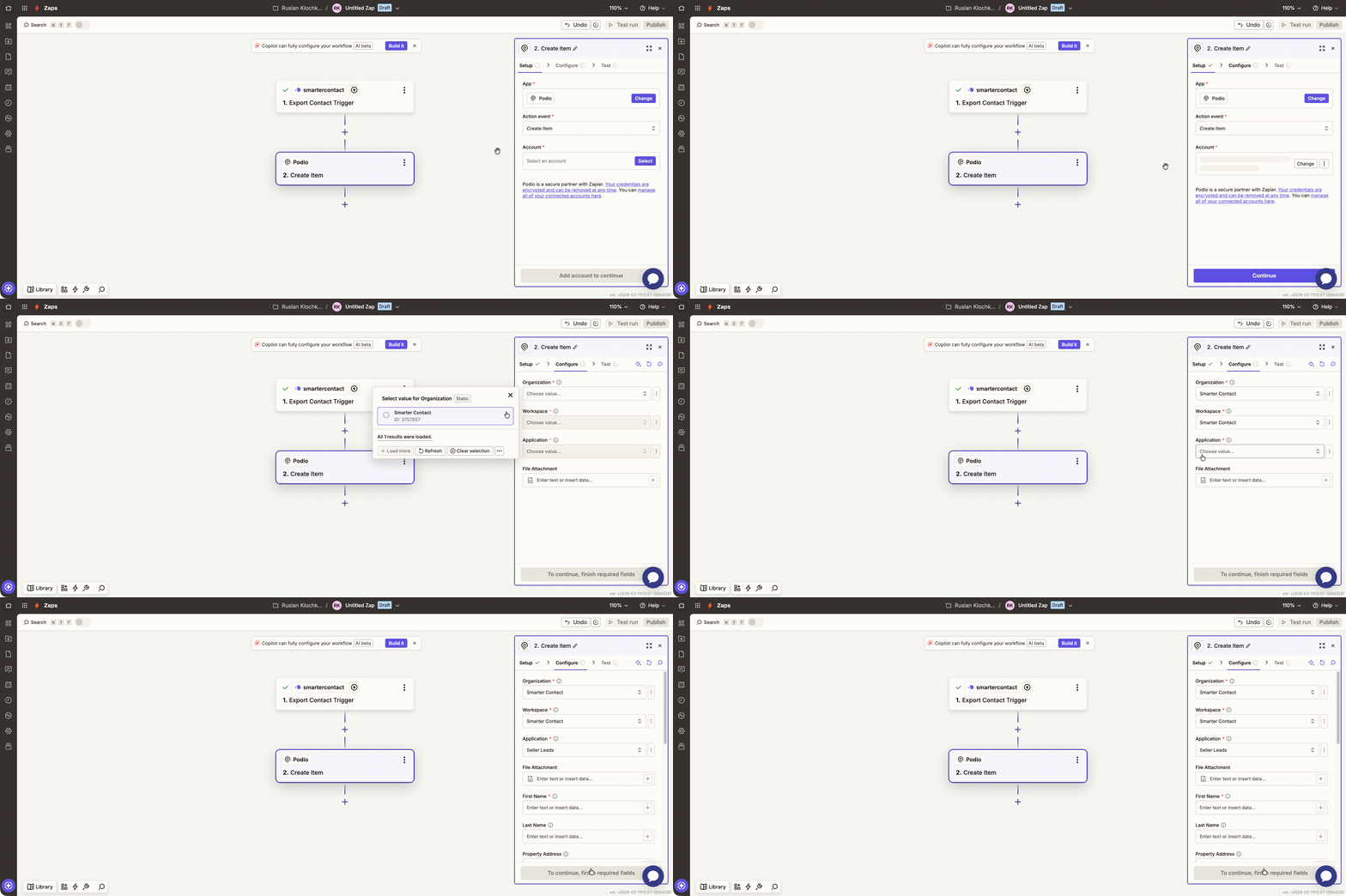
1. Zapier will prompt you to authenticate your CRM account. Depending on your platform, this requires standard OAuth login or pasting an API key from your CRM’s settings.
2. If required, select the specific organizational structure within your CRM where the data should be routed (e.g., Workspace, Organization, List, or Application).
#### Step 5: Data Field Mapping
Map the generated sample data to your CRM fields. Standard mappings include:
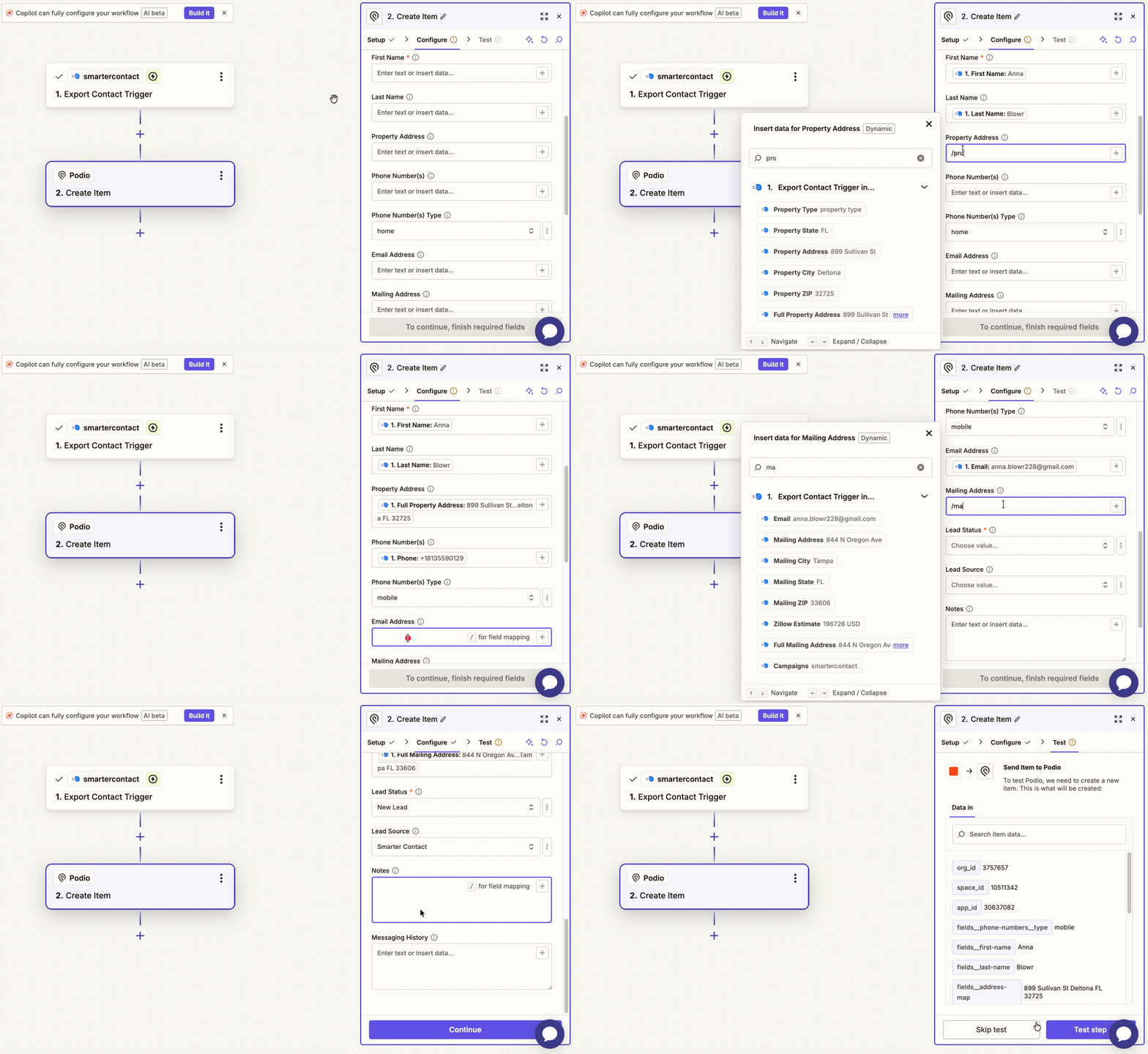
- First Name / Last Name
- Phone Number
- Property Address
- Mailing Address
- Email Address
- Internal Notes
**Retaining Context:** To ensure your sales team has complete context, map the **Messaging History** field. This will export the entire SMS conversation thread along with the contact's profile data.
#### Step 6: Testing and Deployment
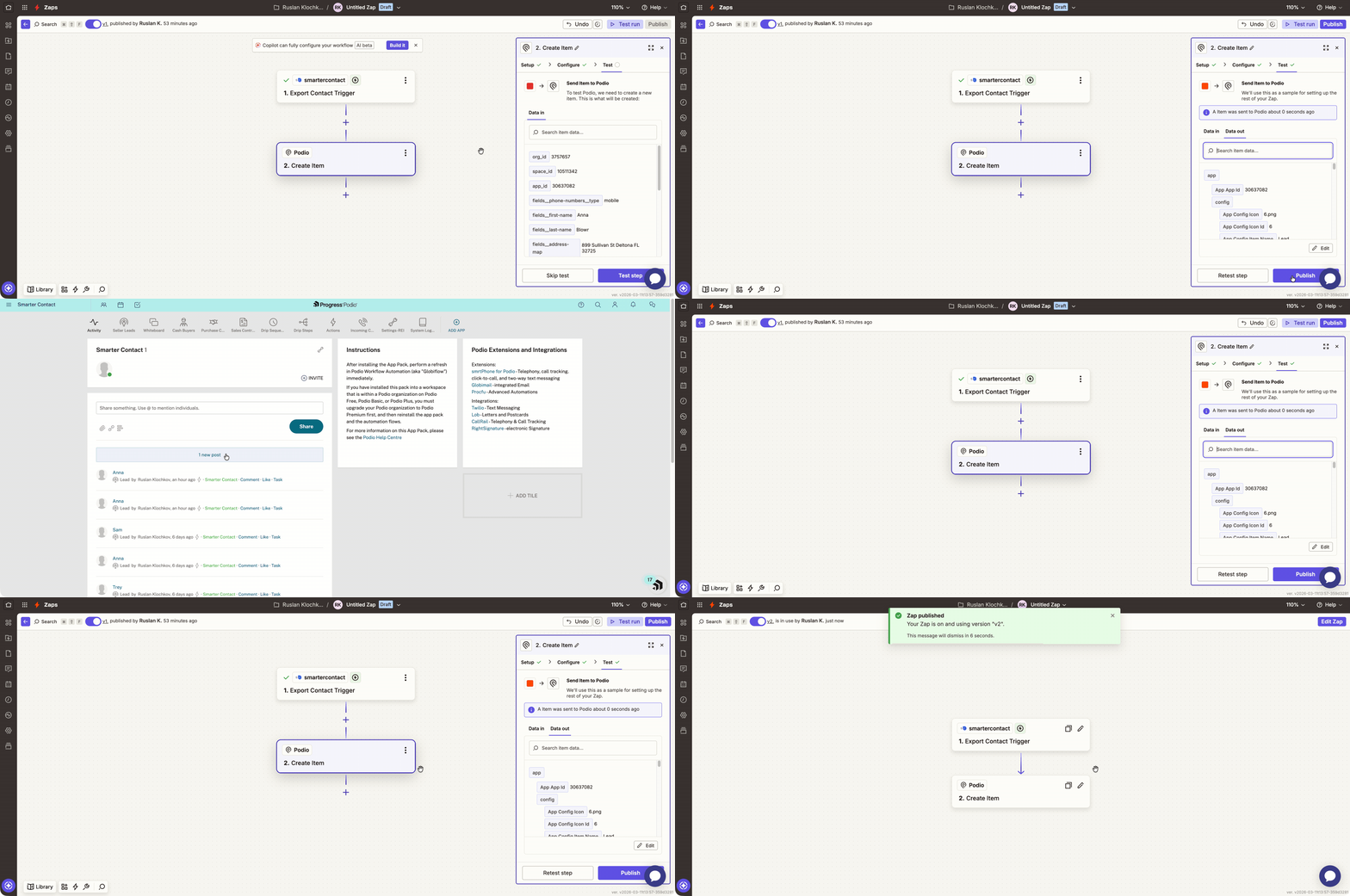
- Review your mapped fields and click **Test Step** in Zapier.
- Verify the test by logging into your CRM dashboard. Ensure the sample lead has populated correctly with all mapped data intact.
- Once verified, return to Zapier and click **Publish**. Your automated workflow is now active.
### Integrating Custom Fields
To integrate your custom fields, you must first finalize your integration and export a live contact record. Once Zapier receives this initial data payload, it will recognize your specific custom fields, allowing you to map them accurately to your destination platform.
- First, export a contact.
- Next, go back to your integration in Zapier and open up **Zap runs**.
- Select the last successful run and use it as your test record.
- Navigate to the trigger step to view the new test record.
- Select this new test record and go through the integration setup one more time, mapping your custom fields wherever you need them.
- Finally, publish the integration.
### Executing Lead Exports in Smarter Contact
Once the Zapier integration is published, you can push data to your CRM directly from the Smarter Contact interface without disrupting your workflow.
#### Individual Real-Time Export
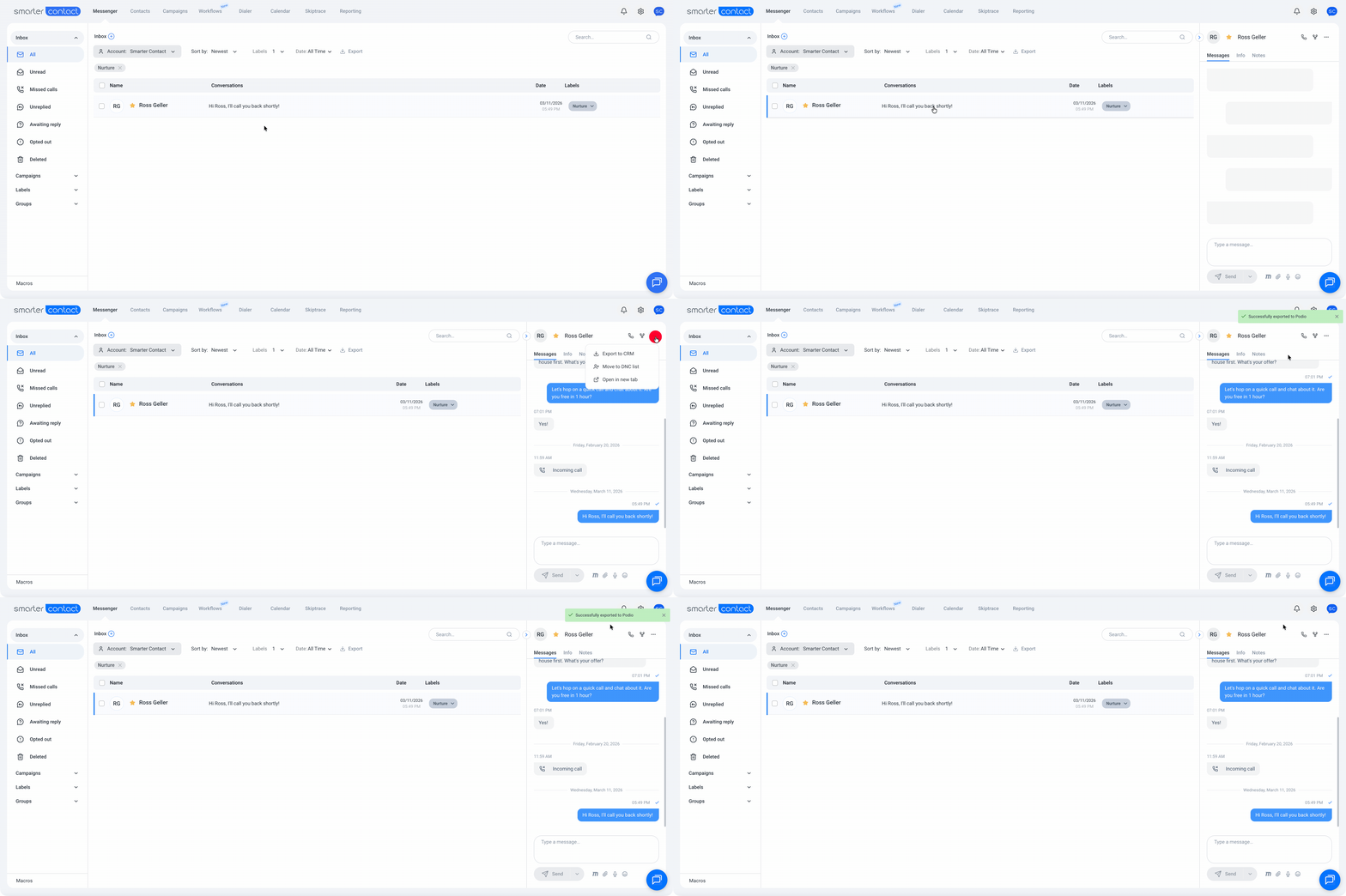
Open a conversation with a lead in the Messenger or Contacts tab:
- Click Export to CRM within the contact profile.
- Select your preferred CRM (if multiple are connected).
- The system will instantly push the contact profile, notes, and messaging history to your database.
#### High-Volume Bulk Export
To process large datasets efficiently, you can execute bulk exports:
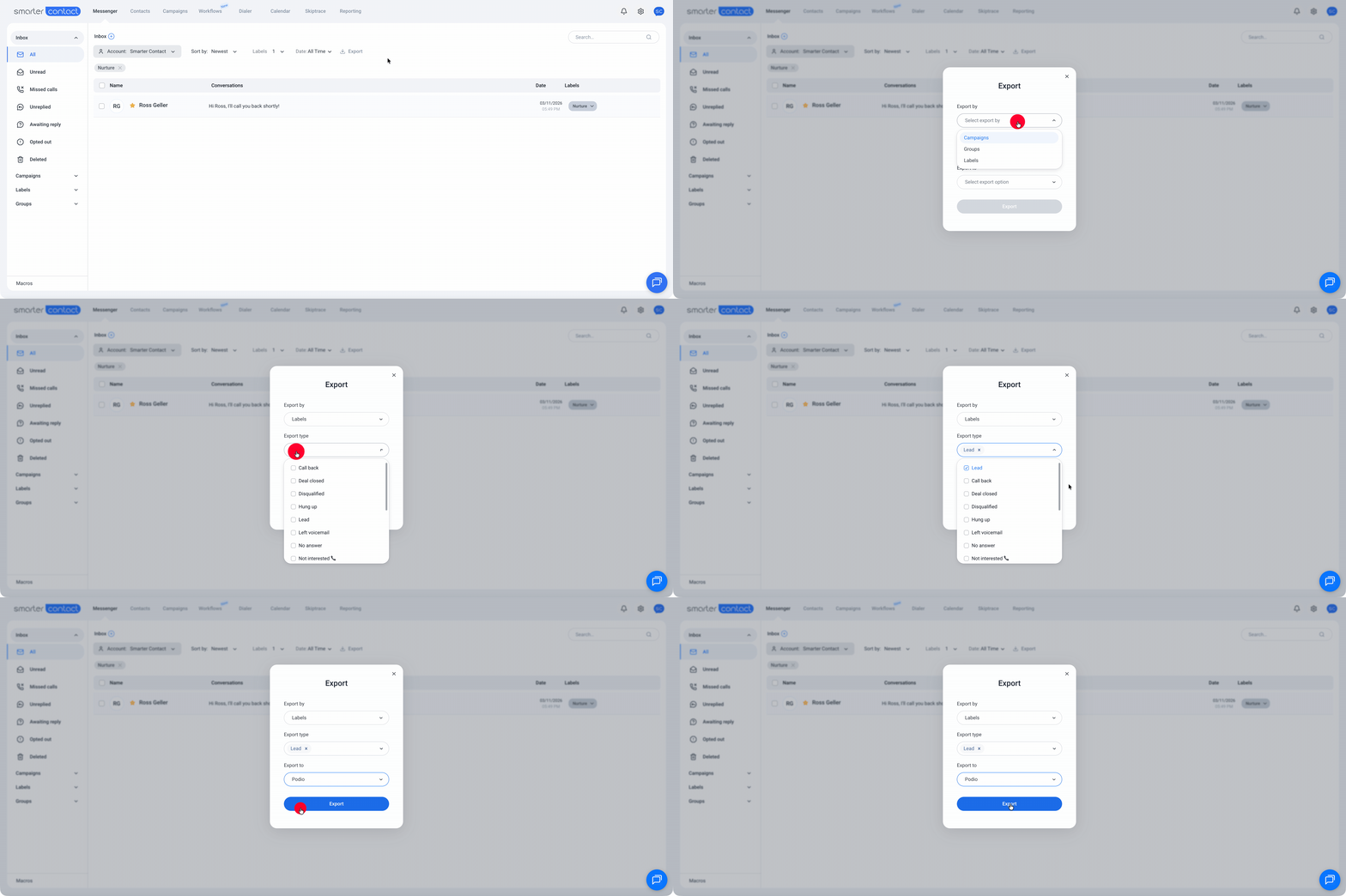
- **From the Messenger:** Select specific Campaigns, Groups, or Labels and use the bulk action menu to push the designated contacts to your CRM.
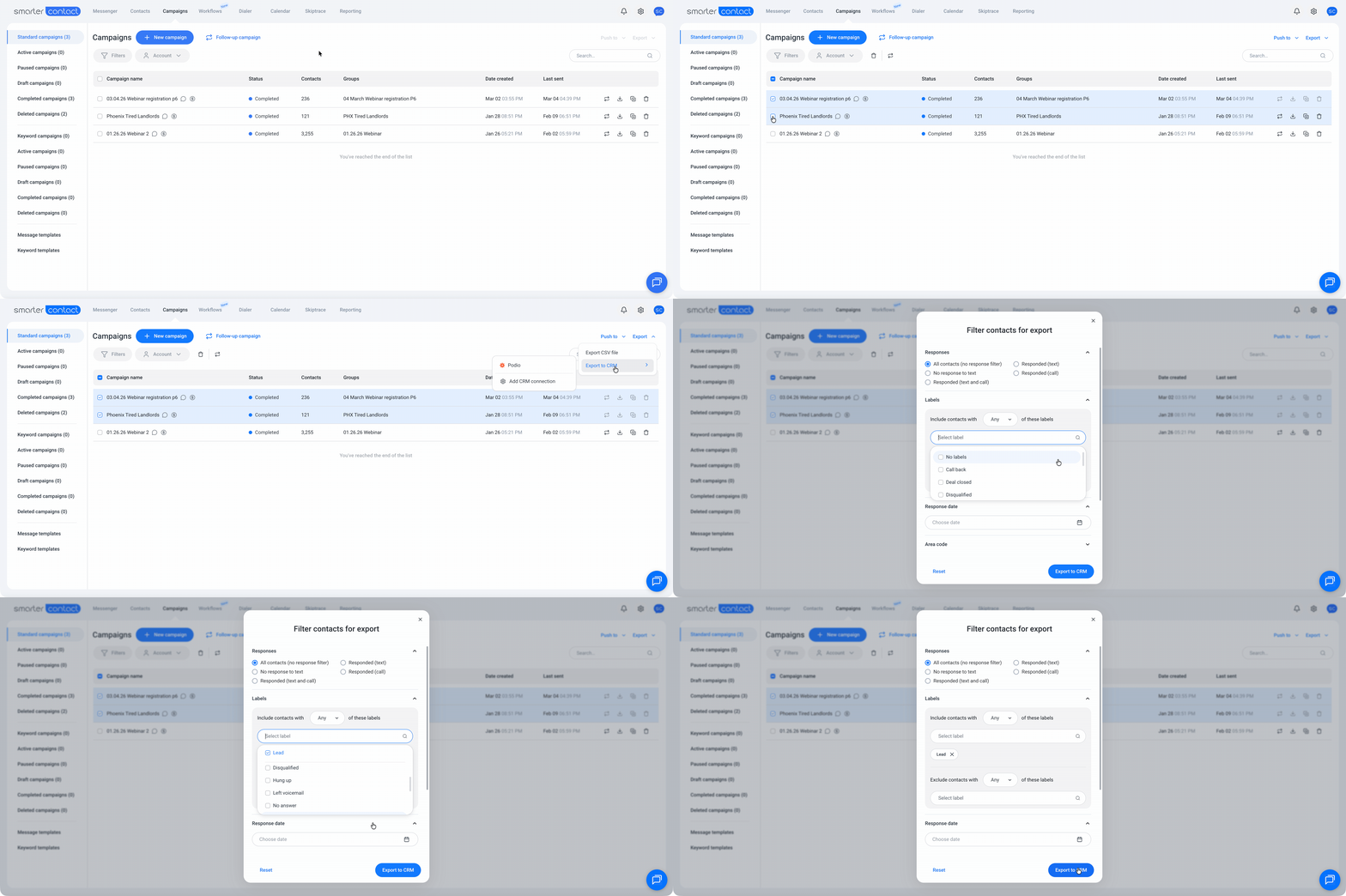
- **From the Campaigns Tab:** Utilize the advanced filtering system to segment your audience, select the resulting list, and execute a bulk export to your CRM in a single action.
##### With 💙, The Smarter Contact Team
- [Contact Us](https://smartercontact.com/contact-us/)
[](http://smartercontact.com)
###### ###### [Product](https://smartercontact.com/pricing/)
[Messaging Plans](https://smartercontact.com/messaging-plan/)
[Calling Plans](https://smartercontact.com/calling-plan/)
[Mobile App](https://smartercontact.com/mobile/)
[What’s New](https://smartercontact.com/whats-new/)
[Pricing](https://smartercontact.com/pricing/)
###### Company
[Privacy Policy](https://smartercontact.com/privacy-policy/)
[Terms & Conditions](https://smartercontact.com/terms-and-conditions/)
[mailto:support@smartercontact.com](mailto:support@smartercontact.com)
Copyright © 2026, Smarter Contact
#### Product
- [Messaging Plans](https://smartercontact.com/messaging-plan/)
- [Calling Plans](https://smartercontact.com/calling-plan/)
- [Mobile App](https://smartercontact.com/mobile/)
- [What’s New](https://smartercontact.com/whats-new/)
- [Pricing](https://smartercontact.com/pricing/)
#### Company
- [Privacy Policy](https://smartercontact.com/privacy-policy/)
- [Terms & Conditions](https://smartercontact.com/terms-and-conditions/)
#### Solutions
- [Investors](https://smartercontact.com/real-estate-investors/)
- [Agents](https://smartercontact.com/real-estate-agents/)
- [Brokers](https://smartercontact.com/real-estate-brokers/)
- [Wholesalers](https://smartercontact.com/real-estate-wholesalers/)
- [Land Flippers](https://smartercontact.com/real-estate-land-flippers/)
- [Fix and Flippers](https://smartercontact.com/real-estate-fix-and-flippers/)
- [Land Developers](https://smartercontact.com/real-estate-land-developers/)
- [Property Developers](https://smartercontact.com/real-estate-property-developers/)
#### Comparison
- [Launch Control vs Smarter Contact](https://smartercontact.com/launch-control-vs-smarter-contact/)
- [Batch Leads vs Smarter Contact](https://smartercontact.com/batch-leads-vs-smarter-contact/)
- [Lead Sherpa vs Smarter Contact](https://smartercontact.com/lead-sherpa-vs-smarter-contact/)
- [ReplySmart vs Smarter Contact](https://smartercontact.com/replysmart-vs-smarter-contact/)
- [ZeitBlast vs Smarter Contact](https://smartercontact.com/zeitblast-vs-smarter-contact/)
- [Sendivo vs Smarter Contact](https://smartercontact.com/sendivo-vs-smarter-contact/)
- [HighLevel vs Smarter Contact](https://smartercontact.com/highlevel-vs-smarter-contact/)
- [XLeads vs Smarter Contact](https://smartercontact.com/xleads-vs-smarter-contact/)
- [ReadyMode vs Smarter Contact](https://smartercontact.com/readymode-vs-smarter-contact/)
- [BatchDialer vs Smarter Contact](https://smartercontact.com/batchdialer-vs-smarter-contact/)
- [PhoneBurner vs Smarter Contact](https://smartercontact.com/phoneburner-vs-smarter-contact/)
- [Roor vs Smarter Contact](https://smartercontact.com/roor-vs-smarter-contact/)
#### Resources
- [Tutorials](https://smartercontact.com/tutorials/)
- [Help Center](https://support.smartercontact.com/?hsLang=en)
- [Careers](https://smartercontact.hurma.work/public-vacancies)
[](https://smartercontact.com)
[](https://apps.apple.com/us/app/smarter-contact/id1637673379) [](https://play.google.com/store/apps/details?id=com.smartercontactapp&pli=1)
© 2026 Copyright Smarter Contact.
All Rights Reserved.
```json
{
"@context" : "https://schema.org",
"@type" : "VideoObject",
"caption" : {
"@type" : "MediaObject",
"contentUrl" : "https://support.smartercontact.com/media-transcripts/219298613392/en.vtt",
"inLanguage" : "en",
"name" : "en Captions"
},
"contentUrl" : "https://21860142.fs1.hubspotusercontent-na1.net/hubfs/21860142/video_assets/219298613392/inherited/web_optimized.mp4",
"dateModified" : "2026-08-12T18:15:00.197Z",
"duration" : "PT4M18S",
"height" : 1080,
"name" : "Zapier Integrations VF",
"thumbnailUrl" : "https://support.smartercontact.com/hubfs/Zapier%20Integrations%20VF.mp4/medium.jpg",
"uploadDate" : "2026-08-12T18:14:44.409Z",
"width" : 1920
}
```